BINARY OPTIONS 5M 15M TRADING SYSTEM MT4
You read the arrow and you place the trade yourself. The binary options system mt4 package is a manual set of indicators and a template, so nothing opens or closes a position for you. An alert box tells you that an arrow has printed, and then you check the rules. Moreover, the whole method lives on the M1 and M5 charts, therefore a decision takes seconds.
What you get in the binary options system mt4
- BINARY 5M 15M SIGNAL + 2 CONFIRMATIONS
- PLATFORM: MT4 (INDICATORS+TEMPLATE)
- TF: M1-M5
- PAIRS: ALL (SEE RECOMMENDED)
- BROKER: BINARY, ALL WITH 5 OR 15 MIN EXPIRATION TIME
- TRADING HOURS: BEST: 7:00 AM GMT to 7:00 PM GMT
Binary 5 or 15 Min Expiration. First, let´s take a look:
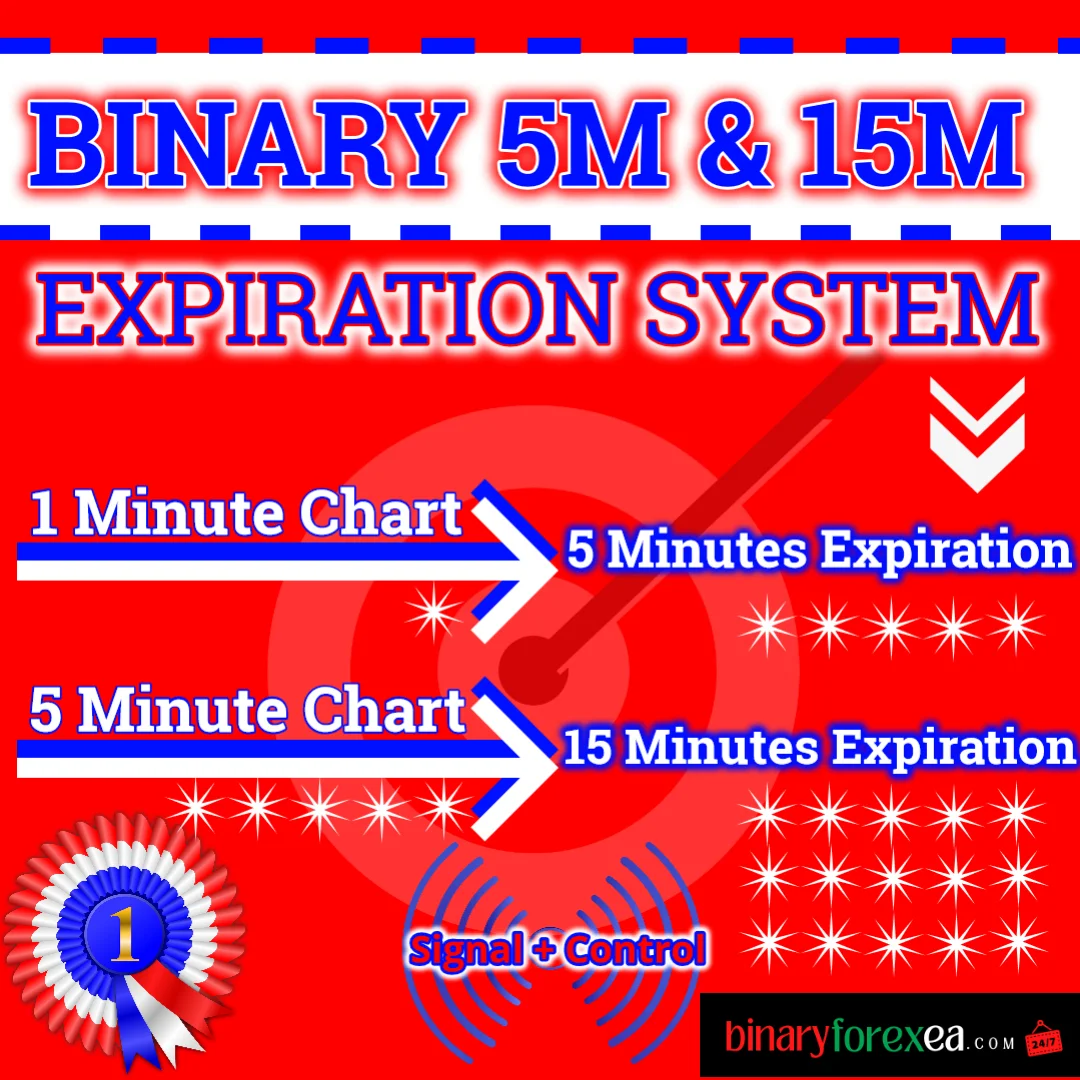
FIRSTLY: Select M1 TF for 5 Minutes expiry trades OR Select M5 TF for 15 Minutes expiry trades.
Step 1: waiting for the signal
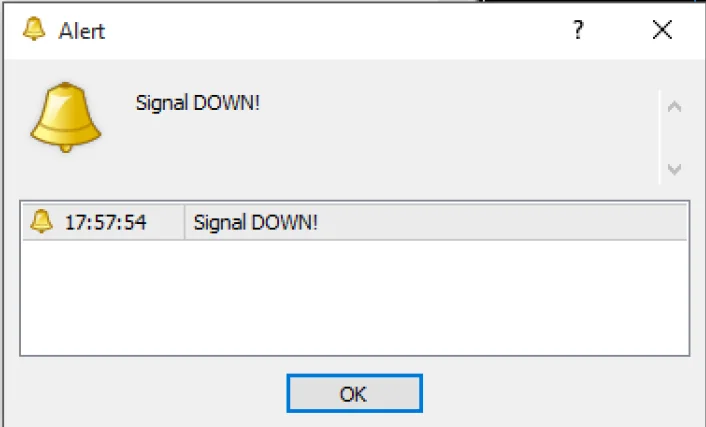
WAIT FOR THE SIGNAL. You will see a small Alert box pop up to indicate that there is an Arrow/Signal on a chart.
Step 2: find the chart that has the arrow
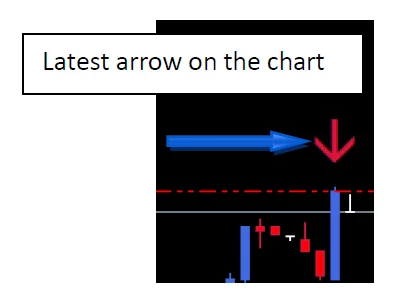
LOOK FOR WHAT CHART/CHARTS HAS THE LATEST ARROW AFTER THE ALERT BOX Pops up (Sometimes you might get multiple signals, so you have to stay alert to know what chart/charts has the latest Arrows). LOOK AT THE IMAGE BELOW TO SERVE AS AN EXAMPLE.
Step 3: wait for the candle to finish forming
IMPORTANT: WHEN YOU SEE THE ARROW, YOU HAVE TO WAIT SO THE CANDLE WILL FINISH FORMING. The Candle timer will help you know when the candle has finished its formation. Look at the image below as an example:
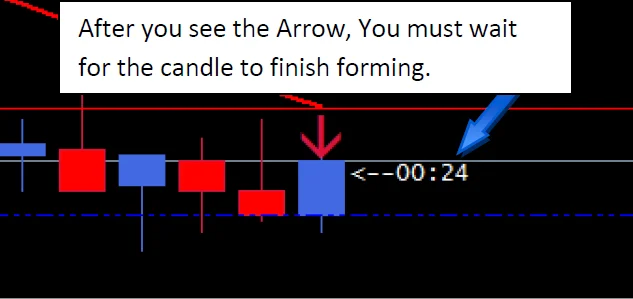
The timer matters more than it looks. Because an arrow can still change while the candle is alive, patience protects the entry. Therefore let the clock reach zero, and only then judge the setup.
Step 4: spotting valid trades with the binary options system mt4
This is the MOST IMPORTANT ASPECT of using the BINARY 5M 15M Template. You MUST follow these rules to get consistent results with the BINARY 5M 15M Template. The steps below helps you know what signals are valid. If you see a setup that is not exactly as shown below, it’s best to avoid the Trade.
NO.1: Wait for the Candle to finish. (Already Explained Previously)
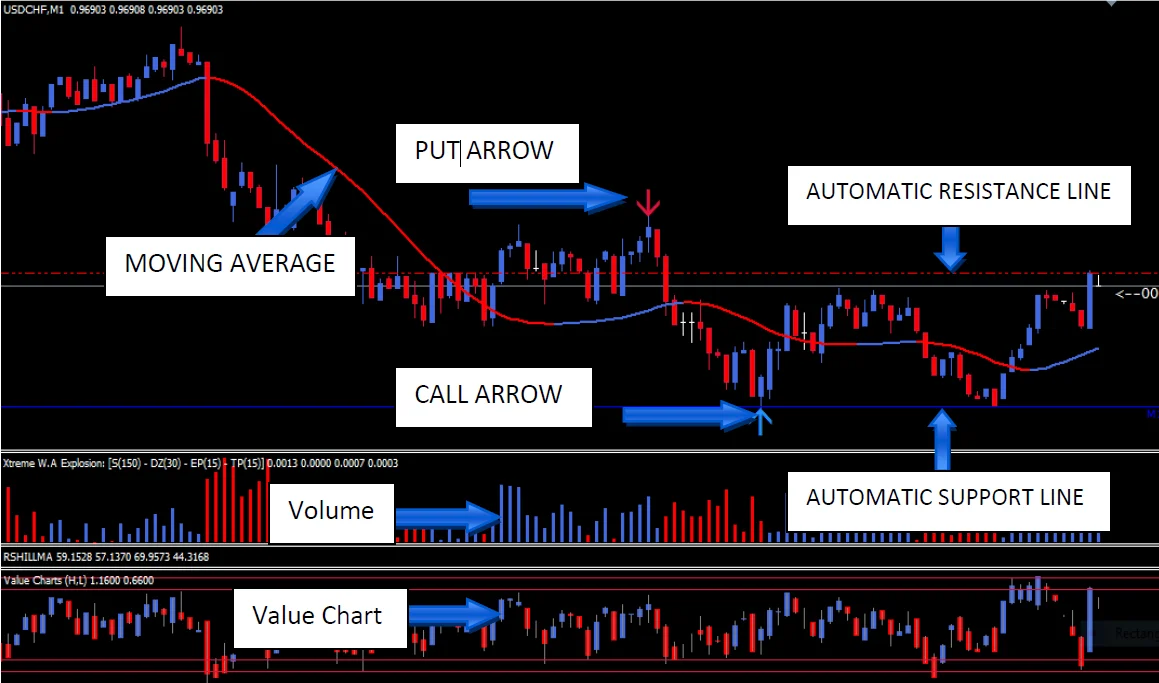
NO.2: After the candle finishes, Check whether the candle finished ABOVE the Support Line (CALL TRADES) OR whether the candle finished BELOW the Resistance Line (PUT TRADES) the candle. Look at the Images below understand better.
IMPORTANT NOTE: IF THE CANDLE FINISHES BELOW THE AUTOMATIC SUPPORT LINE (FOR CALL TRADES) OR ABOVE THE RESISTANCE LINE (FOR PUT TRADES), PLEASE, AVOID THE TRADE AND WAIT FOR ANOTHER SETUP OR ANOTHER ARROW TO POP UP ON THE SAME CHART THAT MEETS THE CRITERIA.
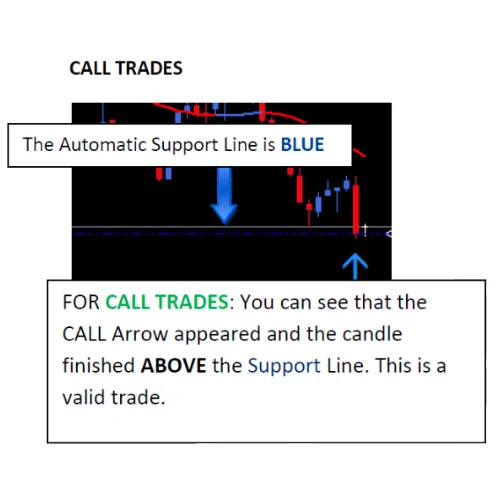
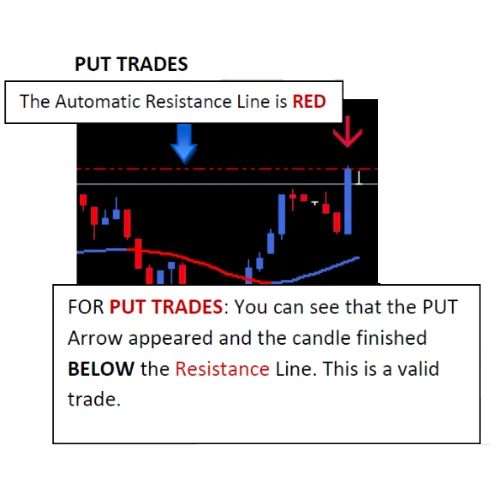
NO.3 EXTRA CONFIRMATION: When everything previously explained meets the criteria, you need to look out for only two more things to finally place the trade.
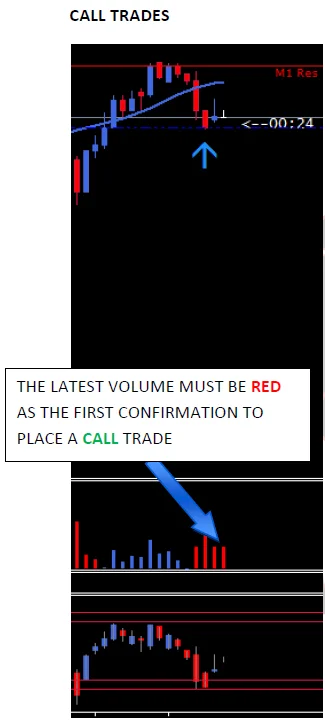
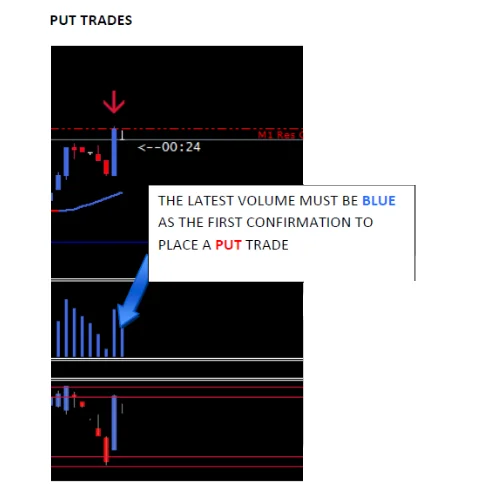
First confirmation
The Latest Volume needs to be RED for Call trades, and BLUE for Put trades. Look at the Images below to understand better.
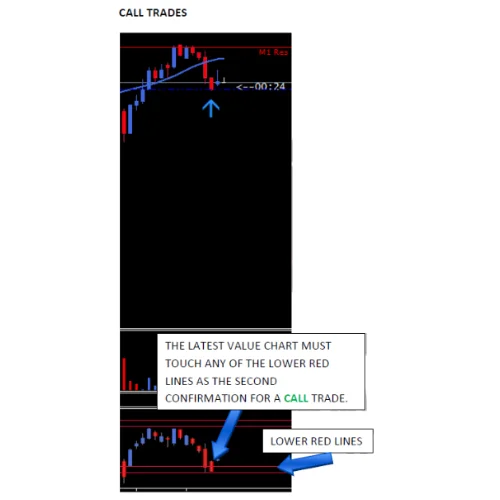
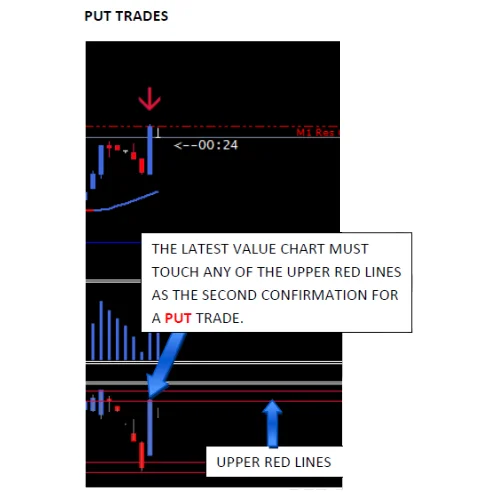
Second confirmation
The Latest Value Chart must touch ANY of the Red Lines. It must touch ANY of the LOWER RED LINES for CALL TRADES OR It must touch ANY of the UPPER RED LINES for PUT TRADES. Look at the Images below to understand better.
Bollinger bands as an extra confirmation
After all the Rules and Confirmations have been followed, you are free to place a trade.
WE ADDED THE BOLLINGER BANDS AS AN EXTRA CONFIRMATION. SO BASICALLY, BEFORE YOU CAN REGARD ANY SIGNAL AS “VALID”, THE CANDLE WITH THE ARROW HAS TO BE TOUCHING/CLOSING OUT OF THE BOLLINGER BAND. THE IMAGES BELOW WILL GUIDE YOU ON THAT.
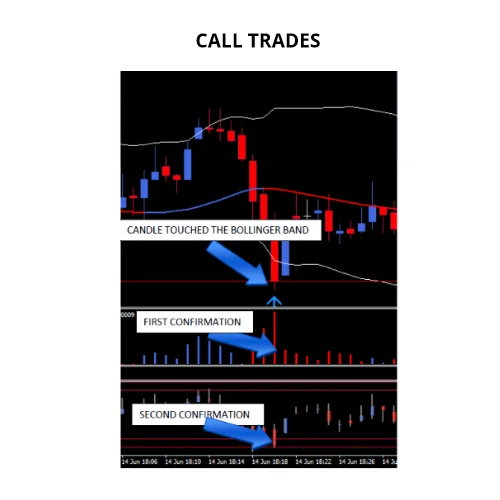
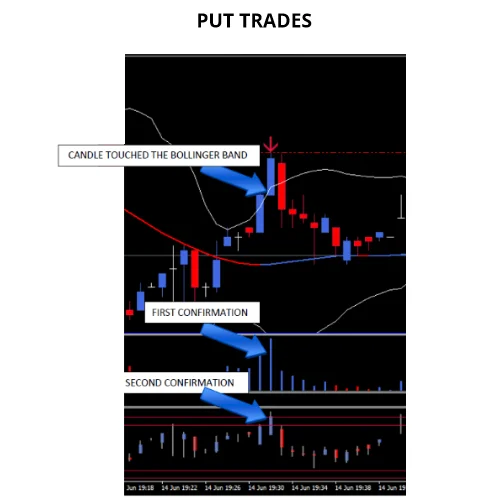
The Bollinger bands add a simple question about stretch. When price closes outside the band, the move has gone far from its average. Therefore a reversal trade starts from a better place, and many weak arrows fall away.
- YOU CAN PLACE 15 MINUTES EXPIRY TRADES EVEN IF THE CANDLE DIDN’T TOUCH THE BOLLINGER BAND.
- MAKE SURE YOU GET ALL THE CONFIRMATIONS.
- REMEMBER, THE M1 TIMEFRAME GIVES SIGNALS FOR 5 MINUTES EXPIRY TRADES, While THE M5 TIMEFRAME GIVES SIGNALS FOR 15 MINUTES TRADES.
Best pairs for the binary options system mt4
It is recommended to trade the BINARY 5M 15M System with the following Currency Pairs: USDCHF, EURUSD, GBPUSD, EURJPY, USDJPY, USDCAD, NZDUSD, AUDUSD, CADCHF and GBPJPY.
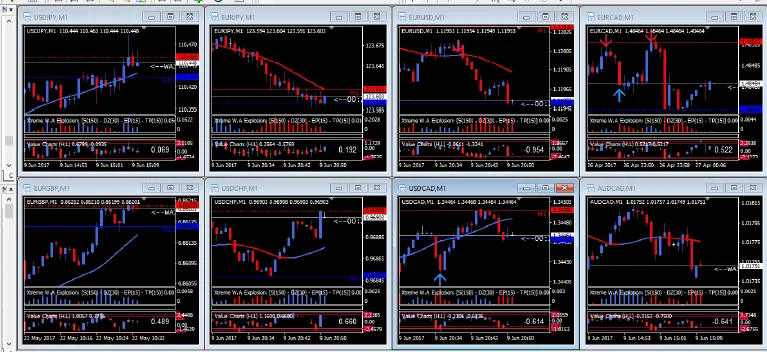
TIPS: IT IS HIGHLY RECOMMENDED TO ADD UP TO 6-8 CHARTS ON YOUR SCREEN, SO AS TO GET MORE TRADING SIGNALS. JUST LIKE THE SCREENSHOT BELOW:
Best time to trade
The best Time to trade the BINARY 5M 15M SYSTEM is from 7:00 AM GMT to 7:00 PM GMT. At this time range, the market has enough Volume.
*Please convert to your own Time zone to know when it’s best to trade in your Region. A quick Google Search can help you find a Time zone converter.
AVOID Slow/Low Volume Markets or if the market looks Squeezed up. AVOID TRADING 15 Minutes BEFORE AND AFTER MEDIUM/HIGH IMPORTANCE NEWS.
Reminders
*ALWAYS TRADE IN A RANGING MARKET OR WITH THE TREND. But in some cases, you can trade against the TREND especially when the market has Volume/Spacious, But nevertheless, Trading against the trend is Risky.
*Avoid Big spikes/Sudden/Fast Candle movements. They indicate that an Important Activity/News/Anomaly is going on in the market, Meaning they bring about false Signals.
If anything at all is unclear to you, feel free to contact us.*
Installing the binary options system mt4 package
Setup takes a couple of minutes. First, open MetaTrader 4 and click File > Open Data Folder. Then copy the indicator files into the Indicators folder and the template into the Templates folder, both inside that data folder. Next, restart the platform or refresh the Navigator panel. Finally, open an M1 chart and apply the template, so the arrow, the lines and both confirmations appear at once.
Before you trade
Pick a broker with a 5 or 15 minute expiration, and keep six to eight charts ready. In addition, follow the rules in order, because a skipped confirmation is where most losses come from. Trading involves risk, therefore only trade with money you can afford to lose. Past results do not guarantee future results. You trade at your own risk.
Instant download after purchase. Questions? Write to info@binaryforexea.com.
Do you also trade the spot market? Then browse our manual tools for Forex. Would you rather let a robot work? Then check all our Expert Advisors.