
Fibonacci Retracement Calculator


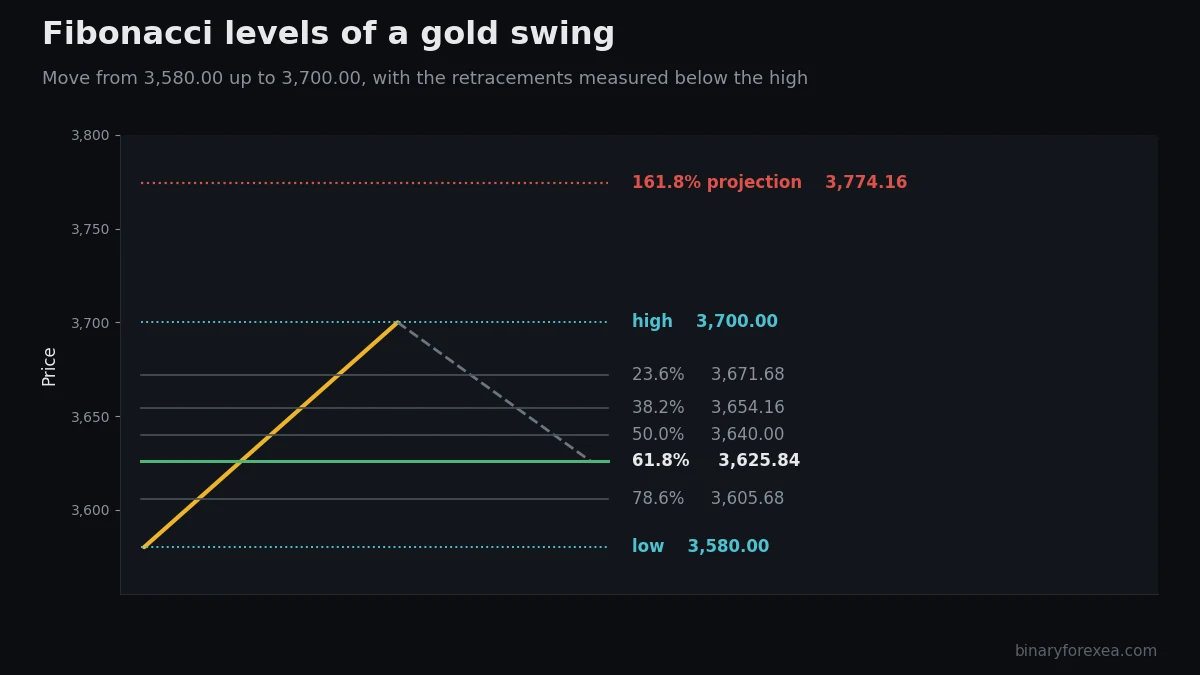
A retracement measures how far price pulls back inside a move that already happened. The calculator takes the high and the low you give it and returns the classic levels: 23.6, 38.2, 50, 61.8 and 78.6 percent of that distance.
Notice that 50 is not a Fibonacci number at all. Traders use it anyway, because half of a move is an obvious place to look, and because enough people watch it that it behaves like a level. In short, these lines work largely by agreement, which does not make them less useful.




Premium Expert Advisors
Looking for more advanced EAs with updates and support?

GOLDEN PIPS PRO EA$450.00 $60.00

STRIKE SCALPER PRO EA 2025$230.00 $210.00

SHARK TANK V2 FTMO EA$499.00 $49.99
Nova Strike EA MT5$19.99

Titanium EA MT5$19.99

AURUM APEX MT5 EA$299.00

Sunstorm EA MT5$19.99

Wolverine EA MT5$19.99

Leviathan EA MT5$89.00
Funded Aladdin FTMO 2026 MT5 EA$99.99 $69.99

HFT AI Fast M1 Gold Scalper MT5 EA$699.00

Behemoth EA MT5$19.99
TURBOBULLION PRO EA MT5$56.00

Starfall EA MT5$19.99

Ultimate Pro Scalper EA$49.99 $34.99

XAU Daily Predator MT5 EA$299.00

EuroGeddon EA MT5$120.00

Greedy King EA MT5$79.99

Aria AI Connector MT5 EA$499.00

STRATEGIC FX PRO V2.25 EA 2026 MT5$180.00
Updated in September 2026