Goldstrike EA MT4: the gold robot that knows when to walk away.
Making money on gold is one problem, and keeping it is a completely different one. The Goldstrike EA MT4 robot was built for the second half of that sentence. It is a fully automated gold specialist for XAUUSD on the M15 timeframe, it trades only with the trend, it builds each position through a disciplined recovery engine, and a hard equity shield guards the balance. However, what really sets it apart is its brain: it knows when to stop and lock in your profit.
So you never have to babysit the terminal or guess when to take money off the table. Goldstrike does that part for you.
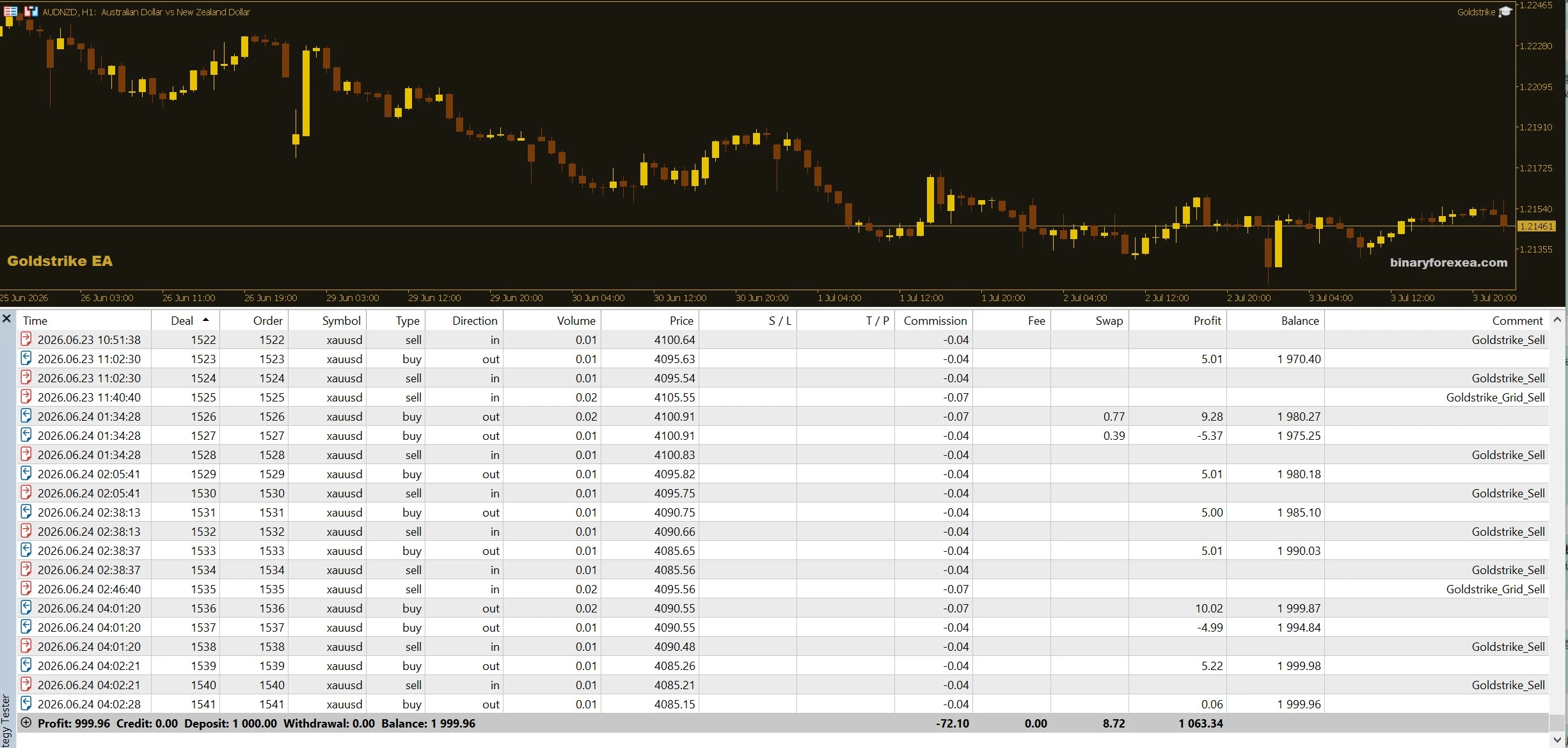
One month on XAUUSD M15 with a $1,000 account
And it was not even running in maximum aggressive mode. During that historical month a $1,000 account still doubled to $2,000, a +100% gain, with a controlled drawdown around 16%:
What is inside the Goldstrike EA MT4
- Recovery grid with lot multiplier, step and maximum layers control.
- Basket take profit, as well as hard maximum drawdown protection.
- Automatic account profit lock, persistent, plus an optional daily profit target.
- Unique magic number, so it runs alongside your other robots.
Filters that keep it on the right side
Direction matters more than speed when you trade gold. Therefore a fast and a slow moving average set the bias, while an ADX strength filter blocks entries whenever the move has no real force behind it. A spread filter then rejects expensive fills, so the robot skips the ugly moments instead of paying for them.
The profit lock that closes the shop at +100%
By default the robot stops automatically once your account reaches +100%, that is, double your initial deposit. When the target arrives it closes everything and stops trading completely, so your profit sits safe while you take all the time you need to withdraw.
- The target is measured over your real initial deposit.
- The stop is permanent for that account, because it stays stopped even if you close the terminal or re-attach the robot. It will never quietly start risking your profit again.
- When you are ready, you reactivate it manually in one click (reload with ResetProfitLock), and then it goes back to work.
Prefer a different target?
That is no problem at all. If you want no automatic stop, simply set the target to 0. If a smaller goal suits your plan better, set 50 for +50%, and so on. In other words, the lock follows your plan rather than forcing you into ours.
Goldstrike EA MT4 setup and requirements
- Symbol: XAUUSD (gold). Timeframe: M15.
- Recommended starting capital: 1,000 USD, because the recommended settings come loaded by default.
- Account type: ECN or RAW only. A professional EA needs a professional environment, and the defaults already account for commissions.
- Finally, run it on a VPS and always try it on demo first.
Installing it in MetaTrader 4
Setup takes about a minute. First, open MetaTrader 4 and click File, then Open Data Folder. Next, copy the file into the Experts folder inside that data folder. Then refresh the Navigator panel, drag Goldstrike onto an XAUUSD M15 chart and enable AutoTrading. After that, check the on chart dashboard once, since it shows the profit lock status at a glance.
Available for both MetaTrader 4 and MetaTrader 5. Instant download after purchase. Free updates for life. Questions? Write to info@binaryforexea.com.
Trading on MetaTrader 5 instead? Then grab Goldstrike for MT5. Looking for more automated gold robots? Browse all our Expert Advisors.