Tech EA MT4: Thunderstrike rides the explosive moves
Expansions are the whole plan behind Thunderstrike, a fully automated tech EA MT4 owners aim at oil and technology shares. Its best ground is WTI oil and names such as BABA and AMD. Forex and ETFs also belong to its list.
Quiet hours get skipped
Spread is all a flat market hands you, so the robot simply declines to pay it. Thunderstrike stands aside through the dull stretches and waits for an expansion to start. It joins once price breaks away, and from there the trailing stop does the steering. As a result, winners get room while losers meet their stop early.
Top performers last month
The three strongest markets last month, shown as account growth:

Markets and timeframe of the tech EA MT4
Thunderstrike covered oil, Forex, stocks and ETFs on the M5 timeframe, from a 100 dollar account and with a 2 percent daily profit lock. Last month WTI oil led the table, while BABA and AMD followed it. In short, volatility matters more here than the asset class.
Multi pair last month (M5, 100 dollar account)
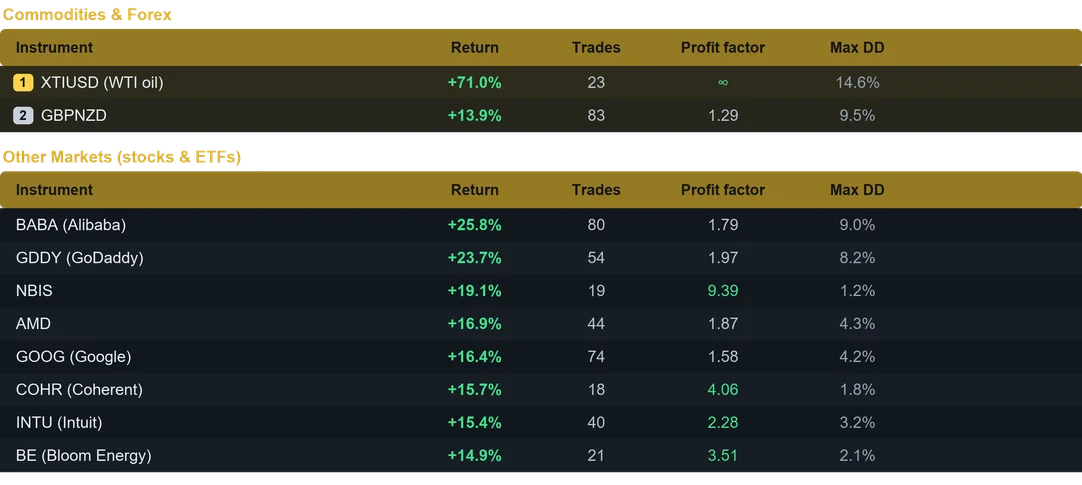
Results from last month on the M5 timeframe. Past performance does not guarantee future results.
Setting up the tech EA MT4 on MetaTrader 4
- First, launch MetaTrader 4 and pick File, followed by Open Data Folder.
- Second, move the robot file into the Experts folder inside it.
- After that, refresh the Navigator in the terminal.
- Lastly, drag Thunderstrike onto an M5 chart and turn AutoTrading on.
Under the hood
- Smart position sizing, so you pick fixed lot or automatic risk percent of balance.
- Protective stop loss and take profit on every position.
- Break even and dynamic trailing, because profit deserves to be locked and followed.
- Trading session control for Sydney, Tokyo, London and New York.
- High impact news avoidance, so the robot steps aside during the spikes.
- Daily profit target and daily loss limit for account safety.
- Weekend shield, since gaps rarely favour an open position.
- Unique magic number, therefore it runs alongside your other robots.
One account, several charts
Ten terminals are not necessary. Fund one account instead, attach Thunderstrike to several charts and set position sizing to Fixed Lot. Each symbol then keeps a controlled size, while the profits add up in the same balance. Since the robot tracks its trades per symbol, the same magic number is safe on every chart. For maximum compounding, run one symbol per account with Risk percent.
Why traders choose Thunderstrike
- Built to ride powerful expansions.
- Standout results on WTI oil and technology shares.
- It also trades Forex and ETFs.
- Built in 2 percent daily profit lock.
- Beginner friendly, with a clean dashboard.
Day to day use of the tech EA MT4
Budget 100 USD per instrument on the M5 timeframe, and keep the terminal on a VPS all week. Begin on a demo account, then trade live with an amount you accept to risk. Also, the user guide and the Inputs tab give the suggested symbol and balance.
Available for both MetaTrader 4 and MetaTrader 5. Instant download after purchase. Free updates for life. Questions? Write to info@binaryforexea.com.
Running MetaTrader 5 as well? Then get Thunderstrike for MT5. Looking for other automated robots? Browse all our Expert Advisors.