True North EA MT5. A GBPCHF EA for MT5 that follows the strongest trends.
True North is a fully automated GBPCHF EA for MT5 and a trend follower at heart. It finds a market pulling hard in one direction, then stays with it. Last month that currency pair led the table, while USDJPY and EURJPY followed close behind.
Trend first, on Forex, indices and shares
The historical run covered Forex majors and crosses, indices and a wide basket of global shares. Every figure comes from the M5 timeframe and a 100 dollar account. Trending US shares gave the standout numbers, while drawdown stayed low across the markets covered.

Multi pair last month (M5, 100 dollar account)
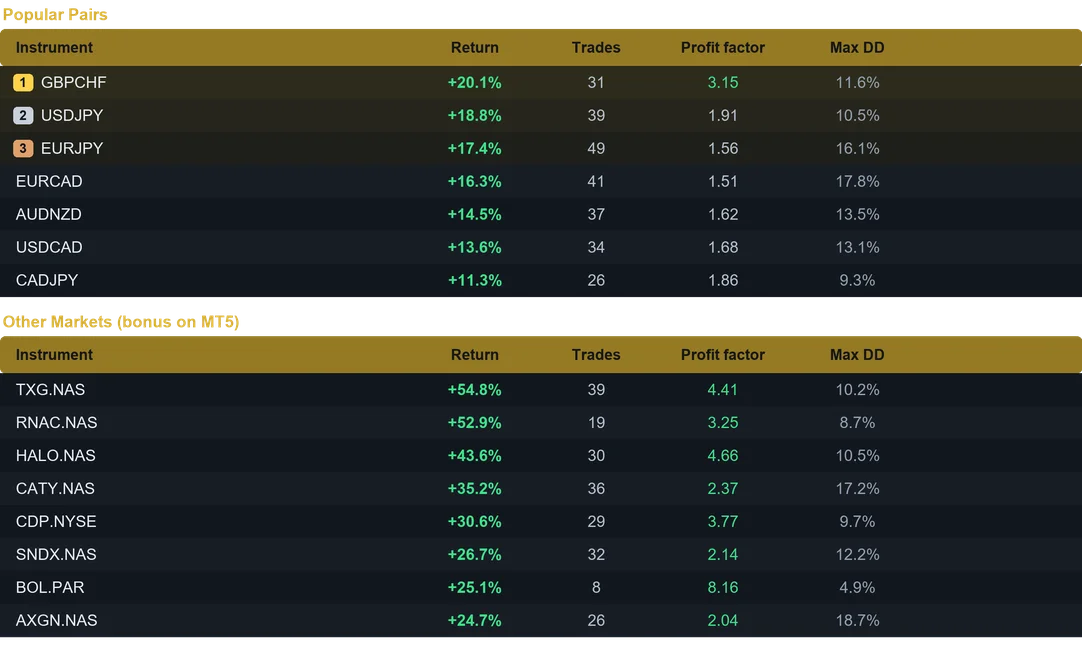
Results from last month on the M5 timeframe. Past performance does not guarantee future results.
Why the GBPCHF EA for MT5 keeps its bearings
- Built to follow strong, persistent trends.
- Standout numbers on trending US shares.
- Solid on Forex majors and crosses as well.
- Low drawdown across the markets covered.
- Beginner friendly, because the dashboard stays clean.
Controls you get
- Fixed lot sizing, or a risk percent of the balance worked out for you.
- A stop loss and a take profit on every position.
- Break even, then dynamic trailing while the trend runs.
- Four session windows: Sydney, Tokyo, London and New York.
- High impact news avoidance.
- Daily profit target and daily loss limit.
- Weekend shield that closes trades before the weekend gap.
- A unique magic number, so your other robots carry on untouched.
Running several charts at once
One account is enough for a whole basket. Attach True North to several charts, then set position sizing to Fixed Lot on each of them. Every symbol keeps a controlled size that way, while the profits add up in the same balance. Since the robot tracks its trades per symbol, the charts never interfere with each other. For maximum compounding, give one symbol its own account and use Risk percent.
Installing the GBPCHF EA for MT5
- First, open MetaTrader and click File, then Open Data Folder.
- Next, place the robot file in the Experts folder inside that data folder.
- Then refresh the Navigator in the terminal.
- Finally, drag True North onto an M5 chart and enable Algo Trading.
Recommended use
- Timeframe: M5. Minimum capital: 100 USD per instrument.
- Run it on a VPS, because a trend can start at any hour.
- Start on a demo account, then go live with an amount you accept to risk.
- Also, the user guide and the Inputs tab list the suggested symbol and balance.
Available for both MetaTrader 4 and MetaTrader 5. Instant download after purchase. Free updates for life. Questions? Write to info@binaryforexea.com.
Trading on MetaTrader 4? Then get True North for MT4. Looking for other automated robots? Browse all our Expert Advisors.