Kill Switch, the ICT kill zones MT4 indicator that catches the stop raid
The London open and the New York open are the two moments of the day when the big players step in. Very often their first move is a trap: price runs past the range built before the open, grabs the stops sitting there, and then turns around. Kill Switch is an ICT kill zones MT4 indicator that draws those windows on your chart and fires one arrow when that raid snaps back inside.
The arrow does not repaint, does not move and does not disappear. It needs a closed candle, and what you see on yesterday’s chart is exactly what you would have seen live.
 Click the image to enlarge
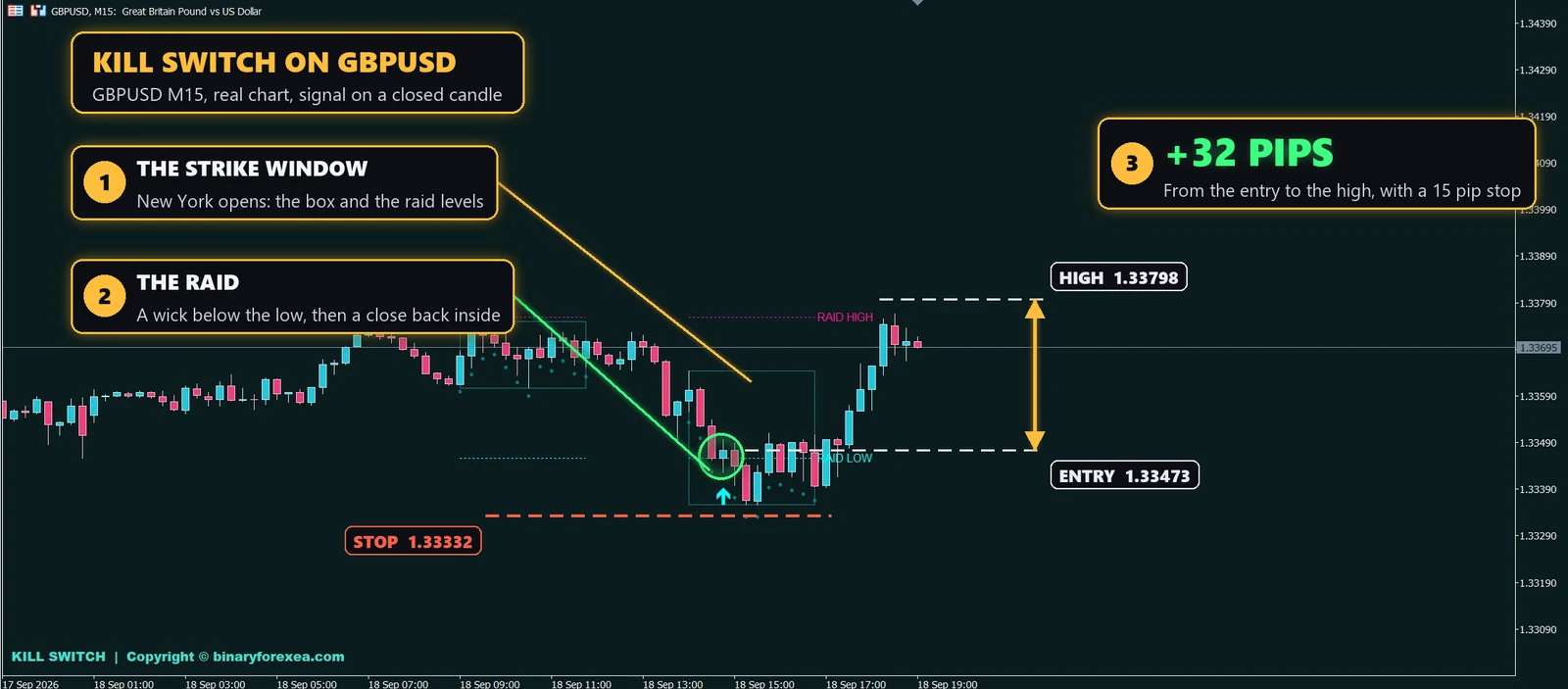
Real chart, GBPUSD on M15. The New York window opens with its box and its two raid levels. Price dips under the raid low, grabs the stops below it, and then a candle closes back inside. The buy arrow prints at 1.33473, with the stop under the raid at 1.33332, a risk of 15 pips. The pound then climbed to 1.33798, 32 pips in a couple of hours, more than twice the risk. Every price comes from the exact candle history of that chart.
What a kill zone really is
First of all, the term comes from the ICT school of trading. A kill zone is a short window around a session open when volume jumps and the day often picks its direction. The forex market trades around the clock, but most of the real money moves in these few hours.
However, the first push inside a kill zone is frequently a fake. Before a big order can fill, it needs someone on the other side, and the stops sitting just past the overnight range are the easiest liquidity to take. As a result, a quick raid past the range and a fast return inside is one of the cleanest reversal clues in the whole day.
How Kill Switch reads the raid
- The window. It marks the London and New York strike windows in server time. You can change both hours to match your broker.
- The raid levels. It takes the high and low the day built before the window opened and draws them as the lines the market will hunt.
- The snap back. Inside the window, a candle pushes past one of those levels and then closes back inside. That close is the arrow.
In other words, a raid below the low gives a buy. A raid above the high gives a sell. Meanwhile, outside the windows the indicator stays quiet, because a raid at three in the morning means nothing.
How to trade the ICT kill zones MT4 signals
- Enter on the close of the arrow candle. The stops were taken and price is already back inside.
- Stop beyond the tip of the raid. If price returns there, the raid was a real break and you want out.
- First target, the other side of the box. Then let the rest ride towards the opposite raid level.
- One good trade per window is plenty. Therefore, after a clean signal, stop hunting for more in the same session.
Markets and timeframes
| GBPUSD | M15, the pair where this ICT kill zones MT4 tool shines |
| Major pairs | M15, same rules |
| Gold | M15, same rules |
For this reason, M15 is the sweet spot. On lower charts a raid looks like noise, and on higher charts the whole window fits in two candles. Also, check the hours once: the defaults are London 9 to 12 and New York 14 to 17 in server time, which fits most brokers on GMT+2 or GMT+3.
What is inside
- London and New York strike windows drawn as boxes, with the hours editable.
- Raid high and raid low for every window.
- Reversal arrows on closed candles only. They do not repaint, move or disappear.
- Optional cushion so the raid has to clear the level by a margin.
- Popup, sound, push and email alerts, each one switchable.
- Premium dark chart theme, applied on attach and restored on remove.
Besides, it reads price only, so any broker and any account works. If you want robots that trade by themselves, browse our automated robots, and the rest of the manual set is in our chart tools for traders.
Questions about this ICT kill zones MT4 indicator
Does it repaint? No. The raid levels come from candles that already closed and the arrow needs a closed candle too. Once it prints, it does not move and it does not disappear.
My windows look shifted, why? Your broker uses a different server time. Change the four hour settings once and they stay put.
Can I narrow the windows? Yes. Each window has its own start and end hour, so you can shorten it to the first hour of the open or shift it to your broker.
Do you have the other version? Yes. This is the MetaTrader 4 build, and Kill Switch for MT5 draws the same windows on MetaTrader 4.
Trading involves risk. Signals are information, not advice, so try any new tool on a demo account first and only trade money you can afford to lose.