
Two pairs, one engine set: the scalper pro EA MT5 traders asked for
EURUSD and GBPUSD, both on the H1 timeframe, share a single robot here. The New Scalper 2030 V4 PRO EA is a scalper pro EA MT5 owners can load on two charts of the same account, because the same three internal engines drive both pairs. EURUSD runs with its included preset, while GBPUSD stays plug-and-play on the default configuration.
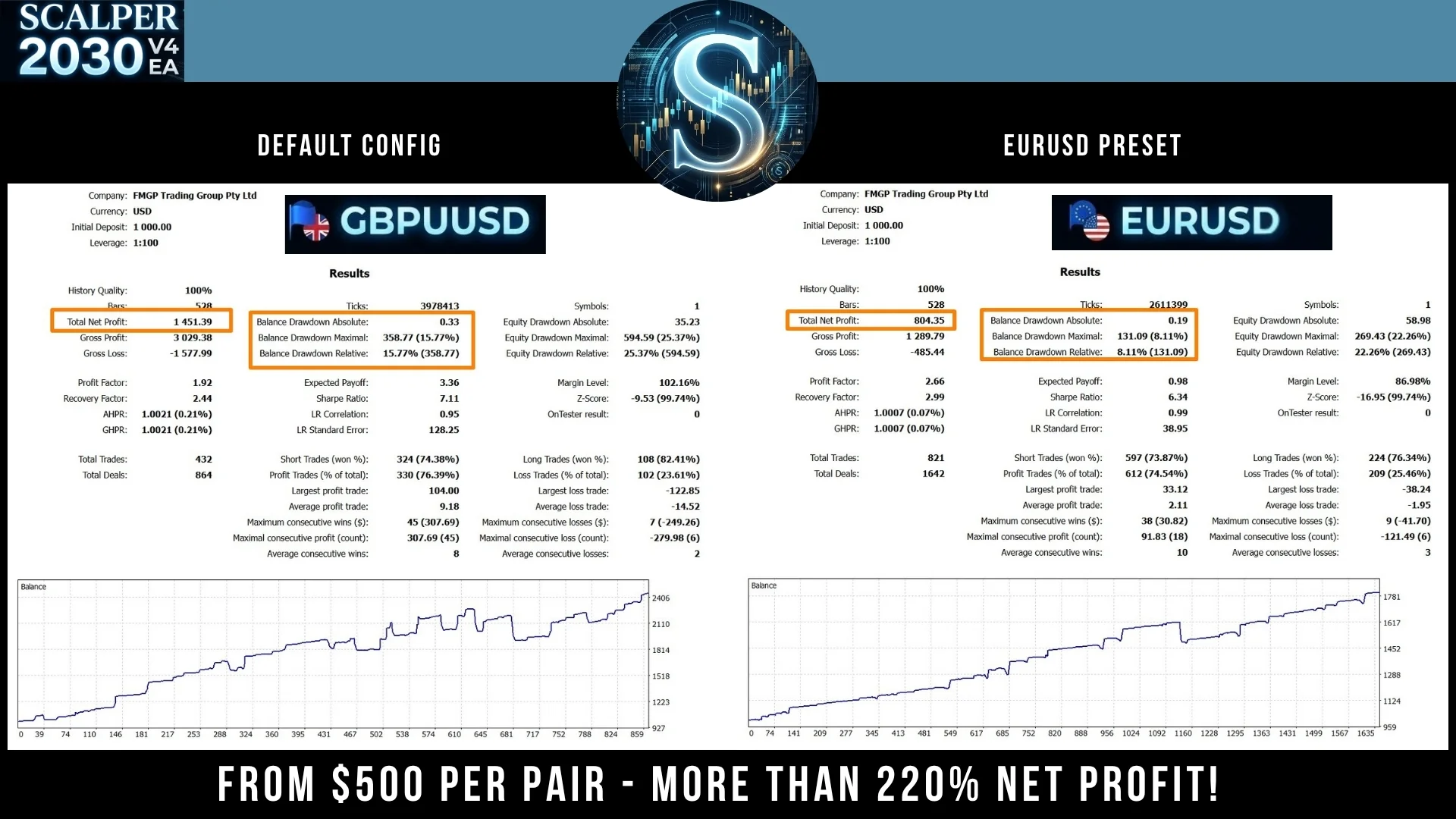
Where this scalper pro EA MT5 trades
- Platform: MT5.
- Timeframe: H1.
- Pairs: EURUSD and GBPUSD.
- Account: ZERO, ECN or low spread.
- Leverage: 1:500.
The 5% total loss limit
This is a very powerful EA, which is why we set a maximum total loss limit of 5% across all trades. Thanks to this, and by combining both pairs, you can target around 220% with a drawdown of under 20%.
That limit applies to every open position at once, not to a single order. Therefore the robot stops adding exposure long before a bad session turns into a bad month.
Why we built it
Because we know you wanted “the tamed beast”, while others merely copy our EAs, our team keeps working diligently and taking note of your requirements. So we enhanced the formidable Scalper 2030 and released this version for MetaTrader 5.
Our improvements, driven by valuable user feedback, include:
- General stabilization for enduring, reliable performance.
- Fine-tuned parameter settings tailored for precision.
- Ensuring no open trades are left behind.
- A conservative, low risk per trade.
- Significantly stabilized drawdown (DD).
- Three internal engines, each with an on/off switch so you run only the ones you want.
- Background color baked into the robot, so no template is needed.
Running the three engines
Each engine carries its own on/off switch, so you decide how much of the robot actually trades. Leave all three active for the behaviour we describe above. Alternatively, switch one off and the remaining engines keep working on their own.
Keep both charts on H1, because the robot reads the structure of that timeframe. Also, add the second pair only once the first one feels familiar to you.
Installing the scalper pro EA MT5 step by step
- First, open MetaTrader 5 and click File > Open Data Folder.
- Then copy the robot into the Experts folder inside that data folder.
- After that, refresh the Navigator, so the robot appears in the list.
- Next, drag it onto a EURUSD H1 chart and load the included preset.
- Also, open a GBPUSD H1 chart and drag it there, this time leaving the default configuration untouched.
- Finally, switch AutoTrading on.
A demo account is the calmest way to start, since you can watch a full week before any real money moves. Moreover, a VPS keeps the terminal online while your computer sleeps.
Risk note
Trading leveraged products carries a high level of risk to your capital, so only trade with money you can afford to lose. Past results do not guarantee future results. You trade at your own risk.
Trading on MetaTrader 4 instead? Then get Scalper 2030 V4 PRO for MetaTrader 4. Looking for other automated robots? Browse all our Expert Advisors.