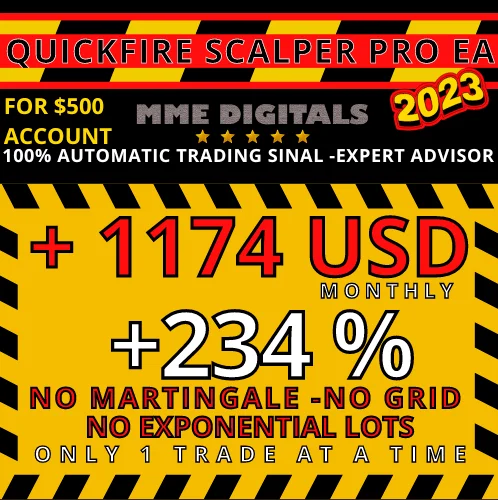
QuickFire Pro Scalping 500, the QuickFire Pro EA by BINARYFOREXEA
QuickFire Pro Scalping 500 is the medium risk member of the QuickFire family, and it asks for a standard account of $500. Moreover, it trades EURUSD only, and it works as a fully automated Expert Advisor for MT4. Therefore, you leave one chart open and the robot handles the orders.
The QuickFire Pro Scalping 500 setup at a glance
- PLATFORM:MT4.
- PAIR: EURUSD
- TF: H1: The EA will use a 5-minute time frame as an entry trigger. However, you must have the 1-hour time frame shown on the chart.
- MIN DEPOSIT: $500 IN STANDARD ACCOUNT ONLY (NO CENT ACCOUNT) / You should purchase the signal that corresponds with the amount you want to deposit into your trading account
- EA TYPE: SCALPER
- LEVERAGE: 1:500
- SPREAD MAX: 2
- HOURS: AROUND THE CLOCK
- IMPORTANT: YOU NEED A BROKER WITH REAL LOW SPREAD, less than 2, (SCALPING) or ECN but in this particular EA, accounts with 0 spread (those that charge a commission per trade) are not recommended. (Roboforex-XM)
INSTANT DELIVERY

Emotion, strategy and money
Trading involves more than just indicators that tell us when to buy or sell. It’s a complex process influenced by three key factors: emotional, strategy, and capital management.
The emotional factor in trading refers to the influence of emotions such as fear and greed on the trader’s decision-making process. Fear can cause the trader to miss opportunities or close positions too early. Greed, on the other hand, can lead to impulsive or overly optimistic decisions.
The strategy involves using the right indicators and knowing how to use them. Traders must be disciplined and patient, sticking to the plan even during periods of market volatility.
But the most important factor is having a capital management strategy that prioritizes making money over winning trades.
Even with a 90% success rate, you can still lose money if you do not set your take profit (TP) and stop loss (SL) levels appropriately.


One payment, four accounts
The signals will be a one-time payment with a limit of up to 4 simultaneous accounts per each signal. If you use one on more than 4 accounts, we block that account, and you must buy the signal again without exception. Similarly, the EA stops working if you ask for a refund or cancel the payment.
Inside the input tab
So, let’s start with the EA. This is what you will see in the EA configuration:
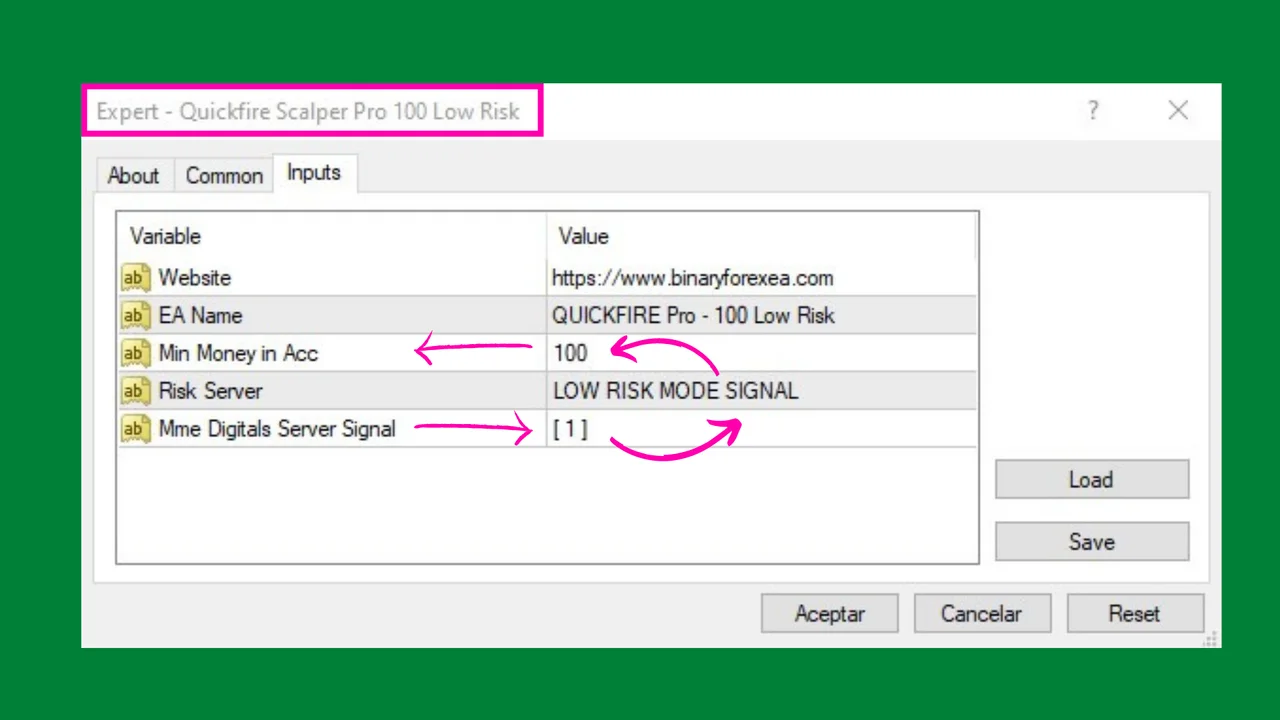
In the EA configuration (input tab), you will only see the server and signal type, but you will not have the ability to make any changes. The EA generates the signal automatically as a “buy-sell signal” in expert mode, and you will not be able to modify its settings.
Each signal type will have a different server, and you cannot change it after purchase. Therefore, please check carefully before purchasing if the signal type suits your chosen capital and risk.
Spread rules the result of QuickFire Pro Scalping 500
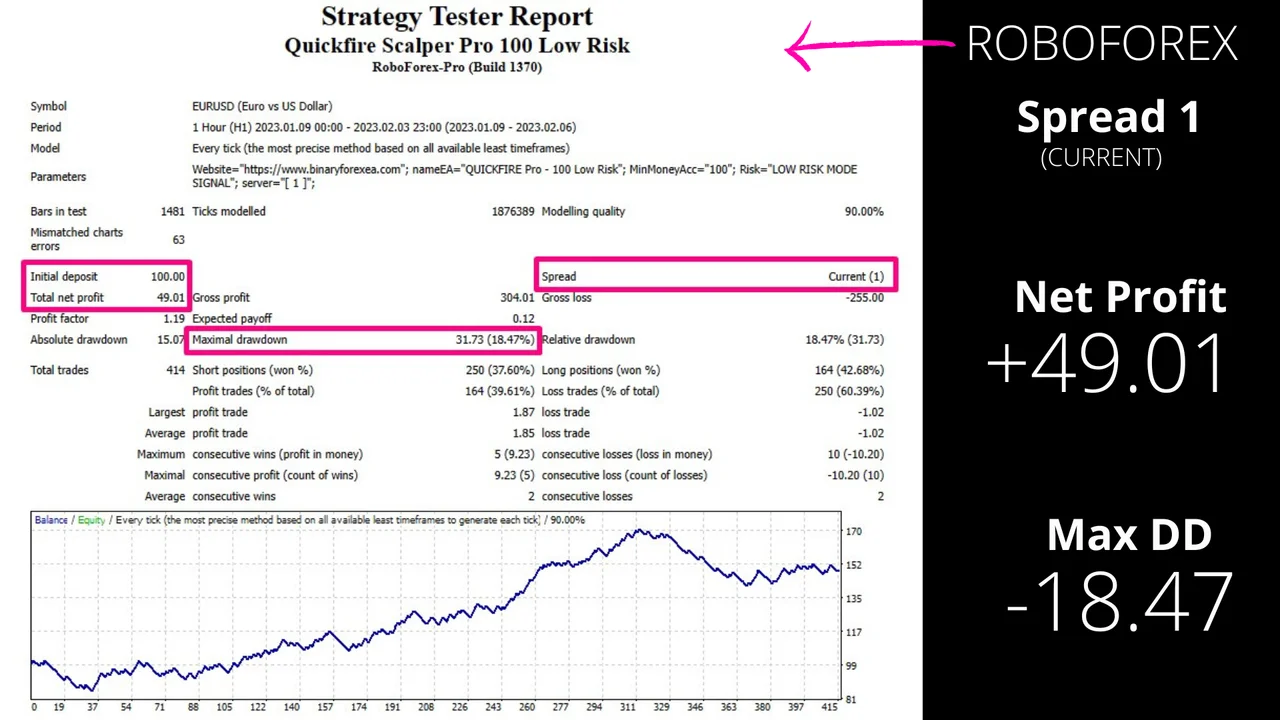
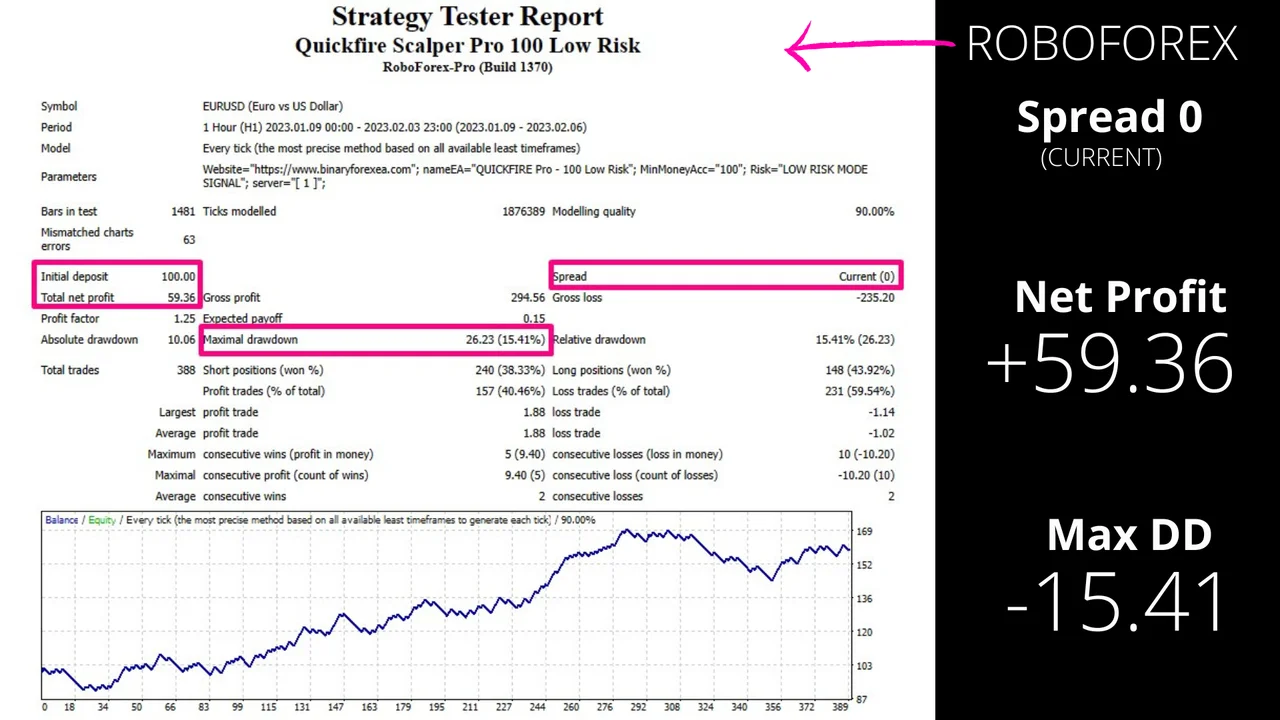
The broker and account type are key factors. We will demonstrate examples of the same signal in different brokers and account types. This EA tolerates a maximum spread of 2 pips. You can choose any broker that consistently offers less than 2 pips on the EURUSD pair.
A scalper pays the cost of every entry, so a cheap quote matters more than a clever filter. Because of that, read about scalping before you pick your broker. Then watch the figure on your own platform during your own session.

Three brokers, three different outcomes
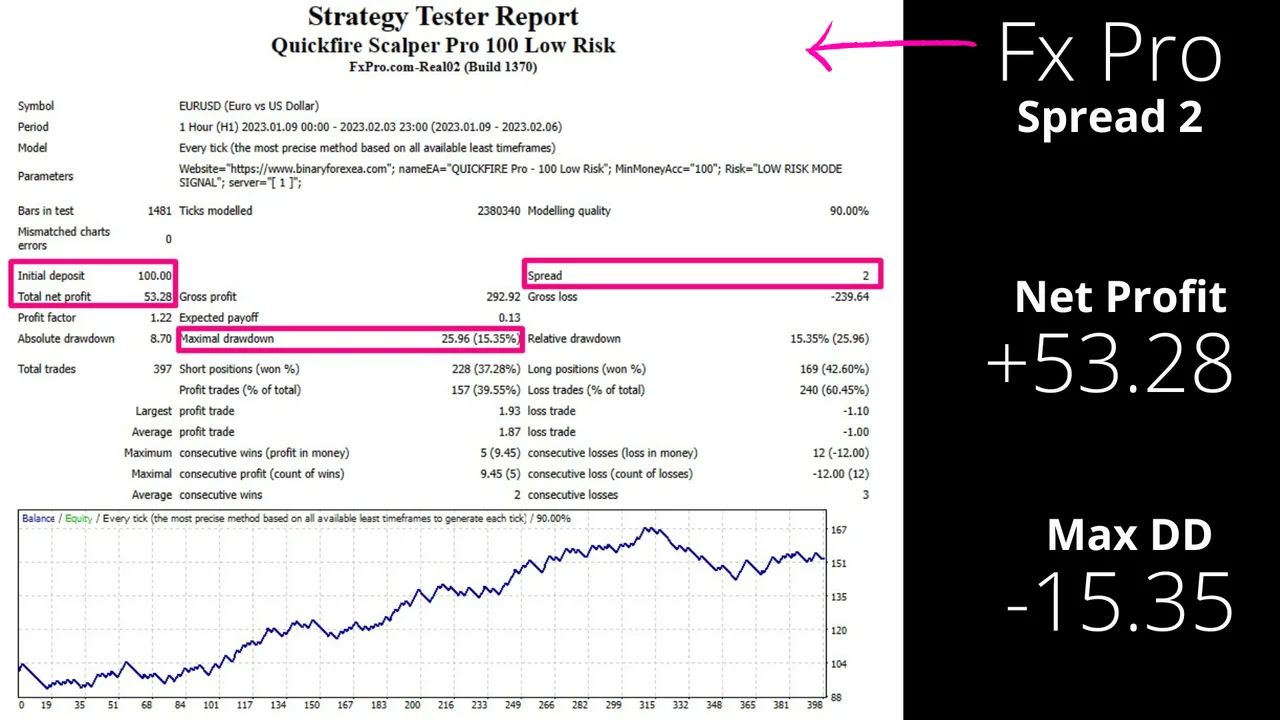
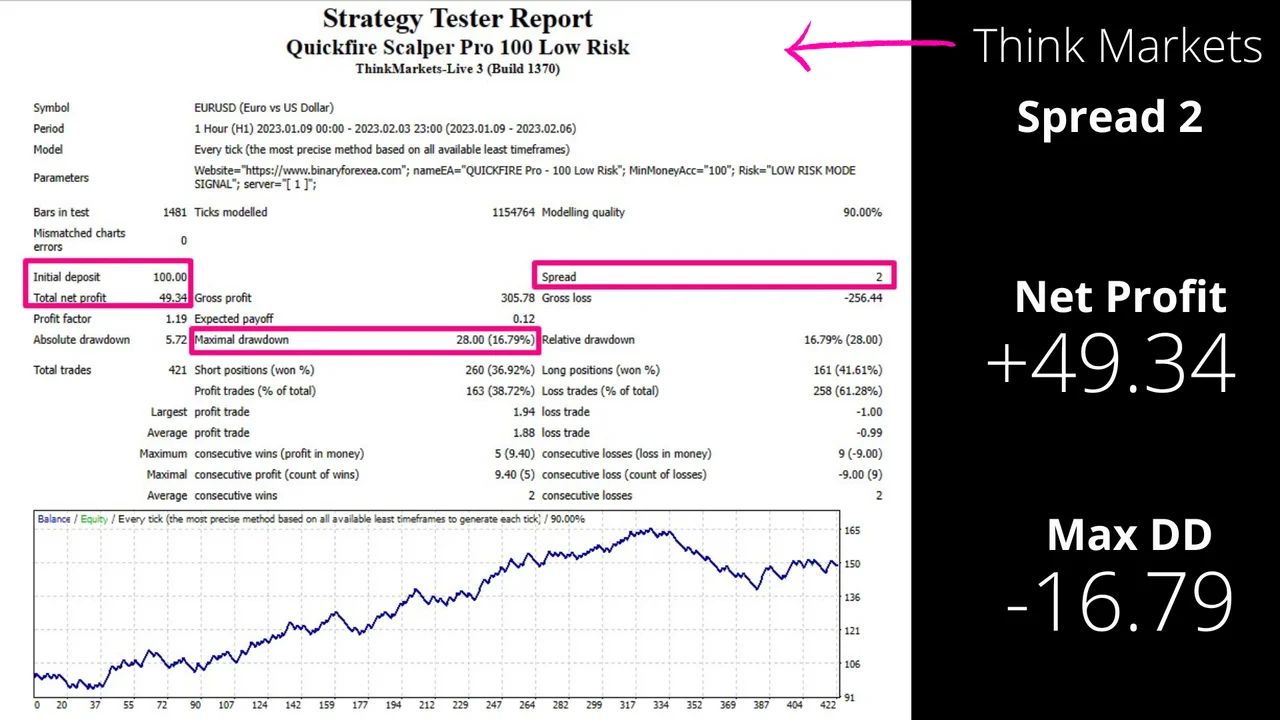
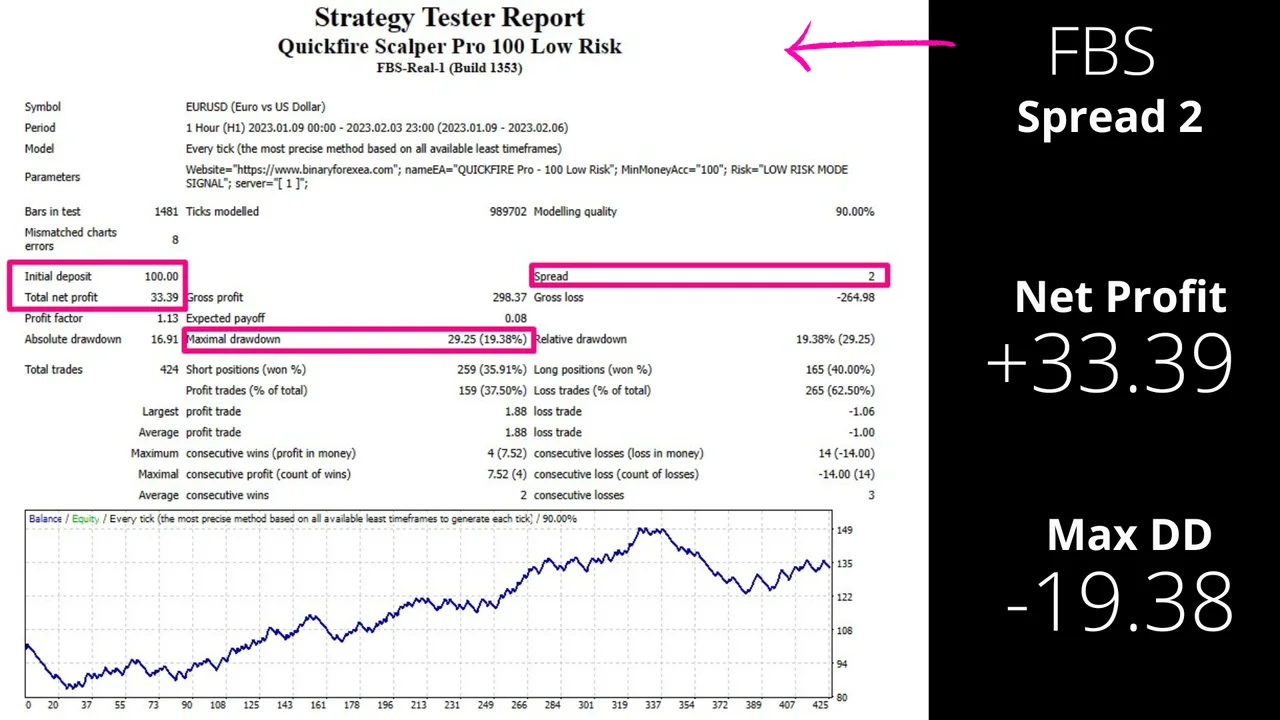
In these three examples, it’s evident that the performance of one of the brokers is significantly better compared to the other two. However, not all brokers can consistently provide less than 2 pips. This is why both Roboforex and XM are popular choices.

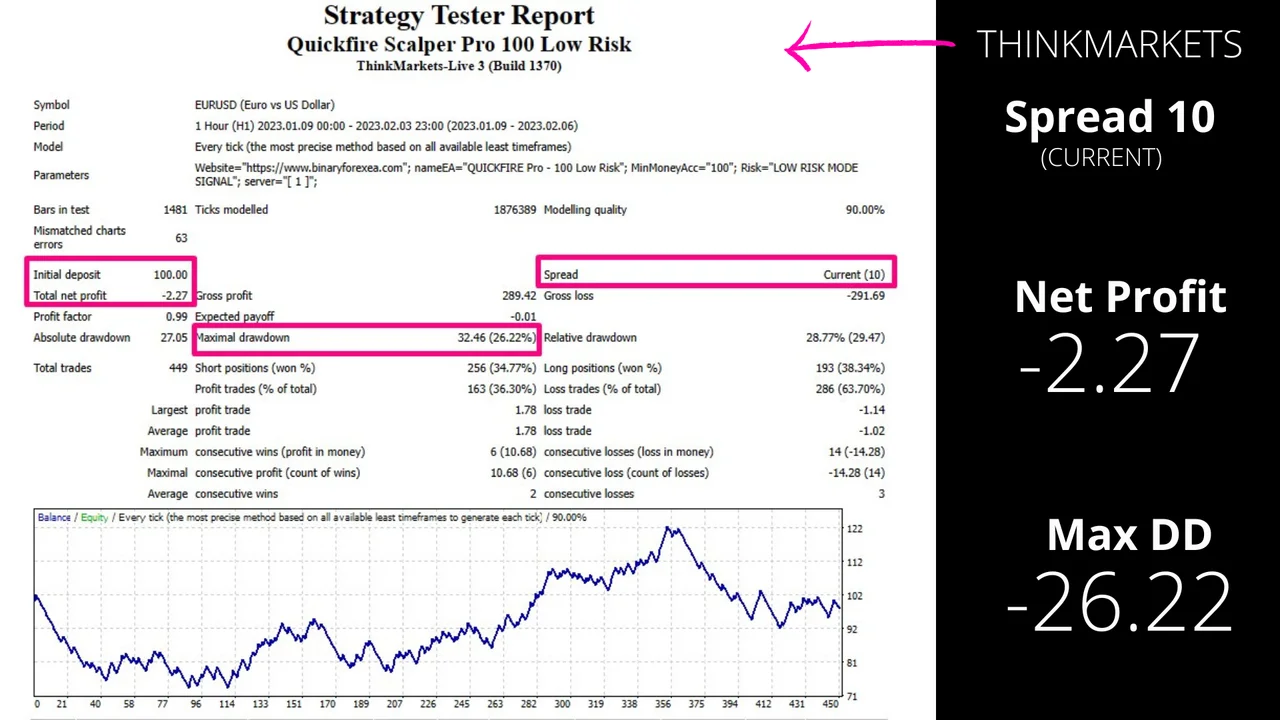


What QuickFire Pro Scalping 500 never does
How is this possible?
We’ve thought about how many people want to trade but don’t dare to because of fear:
QuickFire Scalper Pro EA does not employ any of these dangerous methods: Martingale, Hedging, Gridding, Averaging trading, or lot multiplier.
Moreover, QuickFire Scalper Pro EA only opens 1 trade at a time and never increases the size of the trade.
Also, this QuickFire Scalper Pro EA will never use huge stop-loss to get a small take-profit.
So, we decided not to focus on having a high win rate, but just on how much money the robot generates per month. But without using any questionable practices or resources, just with the simple idea of having a much higher take-profit than stop-loss, so even with a low win rate, we can still get excellent profits without any surprises for the trader.
The H1 chart with an M5 trigger
We used one of our indicators (scalping) on a high time frame (H1), but with an entry trigger based on a M5 time frame, and an early signal from a single period (M1). This allows us to use an H1 time frame, though not with H1 data. Consequently, we can place a relatively small stop-loss and take-profit for this time frame, and both remain achievable. By having a much larger take-profit than stop-loss, we’ve managed to make sure that even if price hits the stop-loss several times, the final outcome is always in our favor (and by a wide margin).
Our EA acts like a patient trader, it sticks to its plan and doesn’t make any changes. It never opens additional trades, increases the size of trades, or hedges.
The $500 medium risk signal
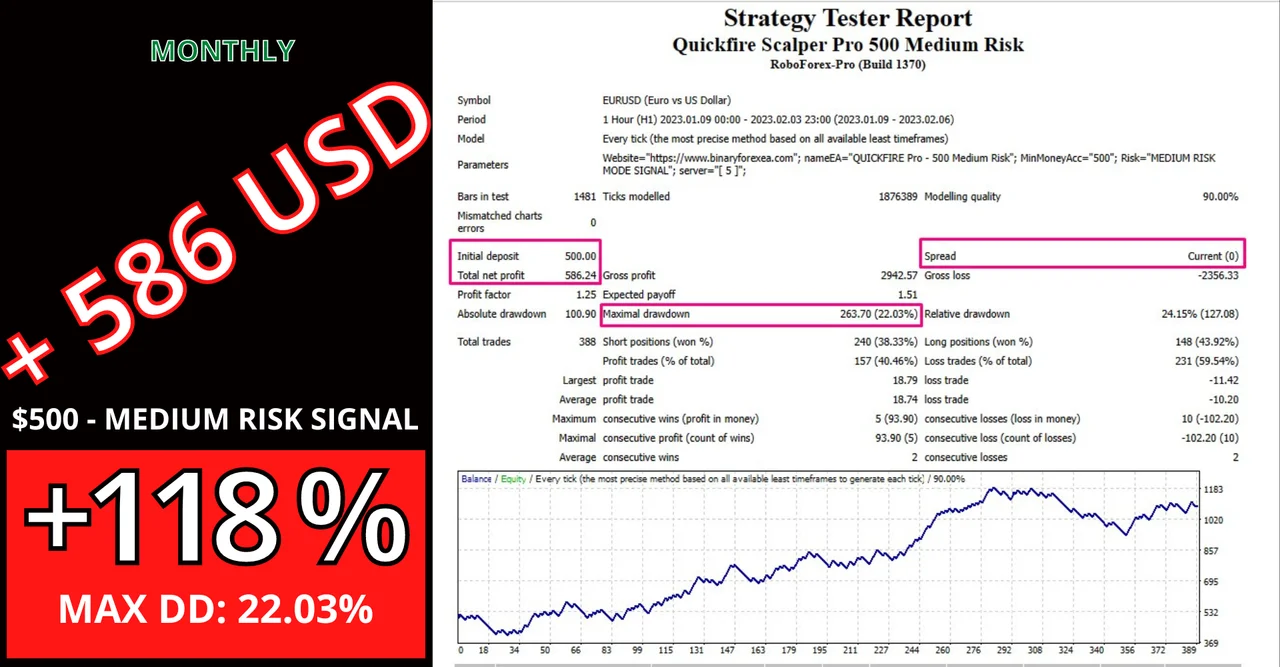
With this in mind, let’s look at more signals for $500 accounts:
$500 MEDIUM RISK SIGNAL:
Installing QuickFire Pro Scalping 500 on MT4
First, open MetaTrader and click File > Open Data Folder. Then copy the robot into the Experts folder inside that data folder. Next, restart the platform or refresh the Navigator panel. After that, drag the Expert Advisor onto the H1 chart of EURUSD. Finally, switch AutoTrading on, and check that the smiley face appears in the corner of the chart.
Before you start QuickFire Pro Scalping 500
Remember:
- If your broker has a high spread (more than 2), the EA will not perform as expected, resulting in lower returns or losses.
- Using a VPS is not mandatory, but if you choose not to use one, you will need to keep your computer running. If you decide to use a VPS, keep in mind that you will need to ask your broker for recommendations and assistance with installation, a VPS located close to your broker’s server will help to minimize latency . Note that we do not provide private VPS installation services.
Open a standard account with $500 and leverage 1:500, because we built this signal for that size. Trading involves risk, therefore only trade with money you can afford to lose. Past results do not guarantee future results. You trade at your own risk.
Do you want to see the rest of our robots for MetaTrader? Then browse all our Expert Advisors.