Stocks EA MT4: Solstice trades shares in volume
Volume and discipline travel together in Solstice, a fully automated stocks EA MT4 owners point at US shares and ETFs. It racks up high trade counts, yet it holds drawdown low. Forex and gold belong to its list as well.
Many trades, small losses
A high count of share trades only helps when each loss stays tiny. Therefore every single position opens with a protective stop loss and a take profit. Break even and a dynamic trailing stop then follow the move as it develops. Above all, the 2 percent daily profit lock banks the good days instead of giving them back.
Top performers last month
The three strongest markets last month, shown as account growth:

Multi pair last month (M5, 100 dollar account)
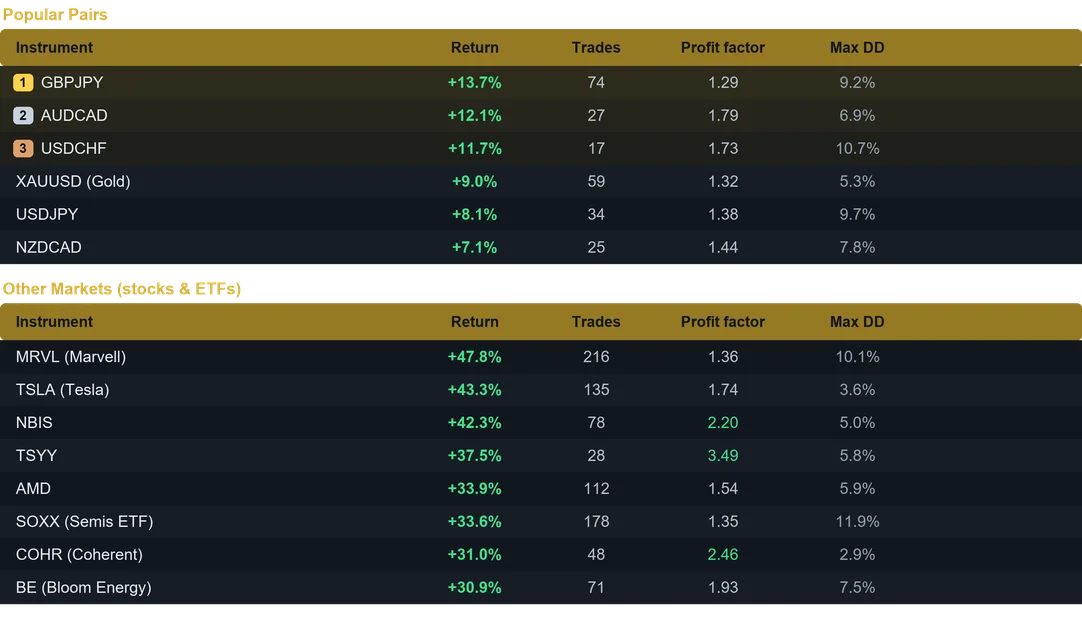
Results from last month on the M5 timeframe. Past performance does not guarantee future results.
What the stocks EA MT4 traded
Solstice ran across US stocks, ETFs, Forex and gold on the M5 timeframe, from a 100 dollar account. Last month US stocks and ETFs came first, while GBPJPY and XAUUSD followed them. Consequently the same robot suits a share trader and a Forex trader equally well.
Putting the stocks EA MT4 on a MetaTrader 4 chart
Installation is short. Open MetaTrader 4 first and choose File, followed by Open Data Folder. The Experts folder inside it is where your robot file belongs. Afterwards, refresh the Navigator list so the new name appears. Then drag Solstice onto each M5 chart and switch AutoTrading on.
Every control on the panel
- Smart position sizing, so you pick fixed lot or automatic risk percent of balance.
- Protective stop loss and take profit on every position.
- Break even and dynamic trailing, because profit deserves to be locked and followed.
- Trading session control for Sydney, Tokyo, London and New York.
- High impact news avoidance, so the robot steps aside during the spikes.
- Daily profit target and daily loss limit for account safety.
- Weekend shield, since gaps rarely favour an open position.
- Unique magic number, therefore it runs alongside your other robots.
Many charts, one balance
Ten terminals are not necessary. Fund a single account instead, attach Solstice to several charts and set position sizing to Fixed Lot. Every symbol then keeps a controlled size, while the profits add up together. Because the robot tracks its trades per symbol, the same magic number causes no interference. For maximum compounding, run one symbol per account with Risk percent. The user guide covers both routes in detail.
Why traders choose Solstice
- A powerhouse on shares and ETFs.
- High trade counts, yet controlled drawdown.
- It also trades Forex and gold.
- Built in 2 percent daily profit lock.
- Beginner friendly, with a clean dashboard.
How to run it well
Budget 100 USD per instrument on the M5 timeframe, and keep the terminal on a VPS all week. Begin on a demo account, then trade live with an amount you accept to risk. Also, the user guide and the Inputs tab give the suggested symbol and balance.
Available for both MetaTrader 4 and MetaTrader 5. Instant download after purchase. Free updates for life. Questions? Write to info@binaryforexea.com.
Running MetaTrader 5 as well? Then get Solstice for MT5. Looking for other automated robots? Browse all our Expert Advisors.