Sunspear EA MT4. Fifty plus markets, a single automated robot.
Sunspear is a fully automated ETF EA for MT4, and an all terrain robot besides. Its historical run stayed profitable across more than fifty instruments, so Forex, metals, US stocks and crypto all belong to the list. Moreover, it even works a Bitcoin exchange traded fund. You attach it to a chart, then you enable AutoTrading, and afterwards the robot handles the rest.
What the ETF EA for MT4 covers
Every number on this page comes from the M5 timeframe and a 100 dollar account. Because a 2 percent daily profit lock sits inside, the robot eases off once the day goes well. Drawdown therefore stays low. Last month GBPUSD, GBPJPY and the IBIT Bitcoin fund gave the strongest growth.

Why traders choose Sunspear
- More than fifty instruments closed the historical run in profit.
- Currencies, metals, US stocks, funds and crypto sit under one roof.
- A Bitcoin ETF joins the list as well, so the reach goes past Forex.
- The 2 percent daily profit lock arrives already switched on.
- Beginner friendly, because the dashboard stays clean and readable.
Multi pair last month (M5, 100 dollar account)
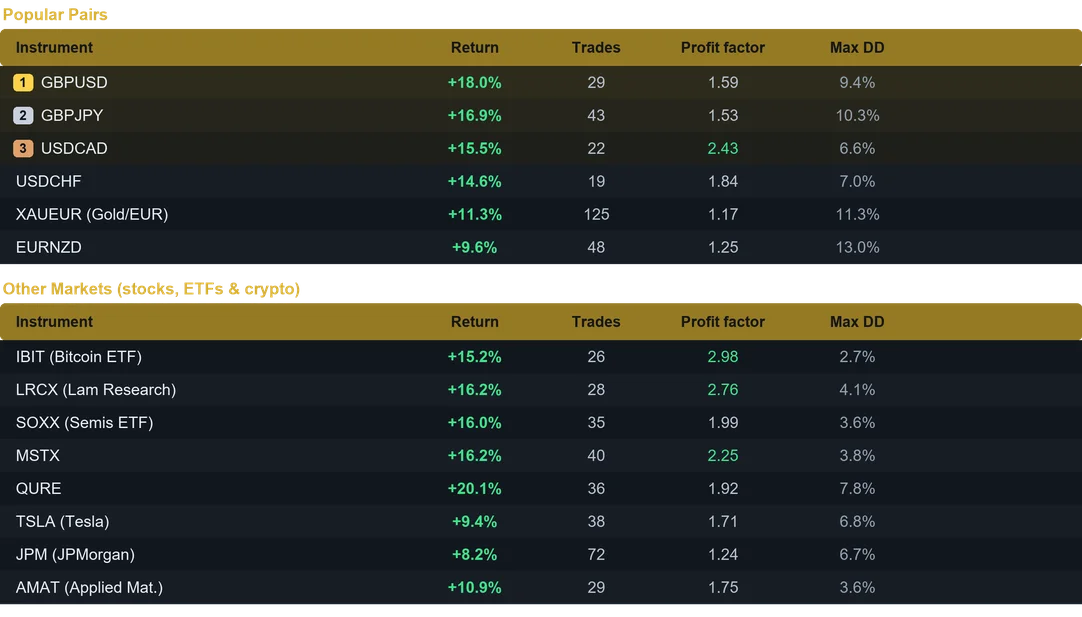
Results from last month on the M5 timeframe. Past performance does not guarantee future results.
Controls inside the ETF EA for MT4
- Sizing on your terms, so a fixed lot or a risk percent both work.
- A stop loss and a take profit ride along with every order.
- Break even comes first, and dynamic trailing then follows the move.
- Session filters for Sydney, Tokyo, London and New York.
- A news filter that steps aside during high impact releases.
- Daily profit target, plus a daily loss limit that guards the account.
- Weekend shield, since gaps open while the market sleeps.
- A magic number of its own, therefore your other robots stay untouched.
One balance, many charts
Ten terminals would only mean ten logins. Fund a single account instead, attach Sunspear to several charts and choose position sizing to Fixed Lot. Sizes stay controlled that way, while every profit lands in the same balance. Since the robot tracks its trades per symbol, one magic number covers every chart safely. For maximum compounding, rather, give one symbol its own account and pick Risk percent. Both routes appear in the user guide.
Installing the ETF EA for MT4
- First, open MetaTrader 4 and click File, then Open Data Folder.
- Next, copy the .ex4 file into the Experts folder you find there.
- Back in the terminal, refresh the Navigator so the name appears.
- Finally, drag Sunspear onto an M5 chart and enable AutoTrading.
Recommended use
- Timeframe: M5. Minimum capital: 100 USD per instrument.
- Keep the terminal on a VPS, because nothing should stop overnight.
- Begin on demo, and afterwards commit an amount you accept to risk.
- Also, the Inputs tab and the user guide hold the suggested symbol and balance.
Available for both MetaTrader 4 and MetaTrader 5. Instant download after purchase. Free updates for life. Questions? Write to info@binaryforexea.com.
Trading on MetaTrader 5 instead? Then get Sunspear for MT5. Besides that, you can browse all our Expert Advisors.