Unbeatable THUNDERDOMINATOR EA. Forex MT4 Expert Advisor for the M1 chart.
The THUNDERDOMINATOR EA is an ultra fast MetaTrader 4 robot that works EURUSD, GBPUSD and XAUUSD on M1, around the clock. It was built for an electronic communication network account, therefore an ECN or zero spread broker is where it shows its real face. On a Standard or Cent account the drawdown simply grows.
Specifications of the THUNDERDOMINATOR EA
- Platform: MetaTrader 4.
- Timeframe: M1.
- Pairs: EURUSD, GBPUSD and XAUUSD (gold).
- Minimum deposit: $1000 per pair in an ECN or zero spread account.
- Hours: around the clock.
- Leverage: 1:500.
- Broker: Roboforex ECN, or any ECN or zero spread account. Using a Standard or Cent account will make your DD higher.
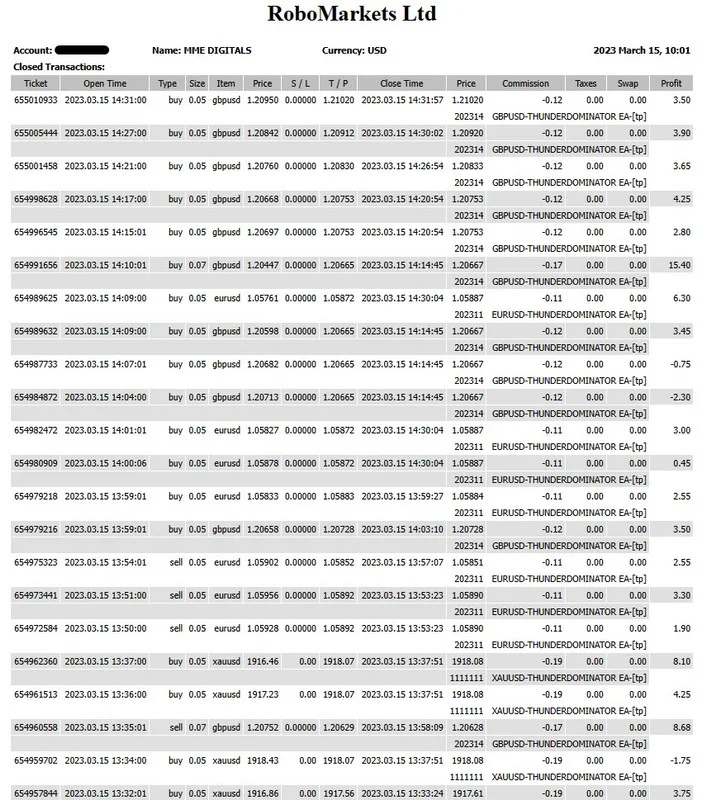
New update: Wednesday 15, 10:01 AM
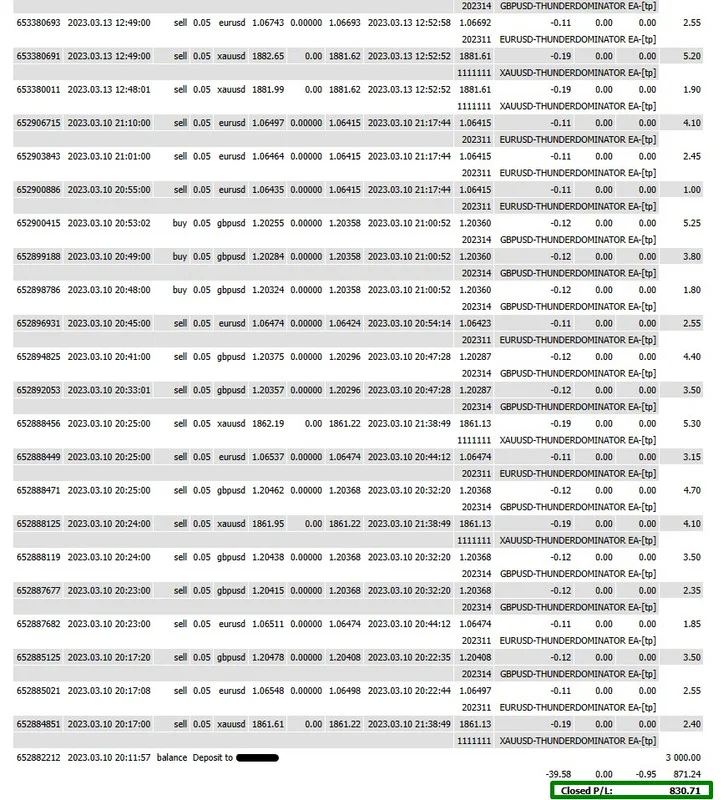
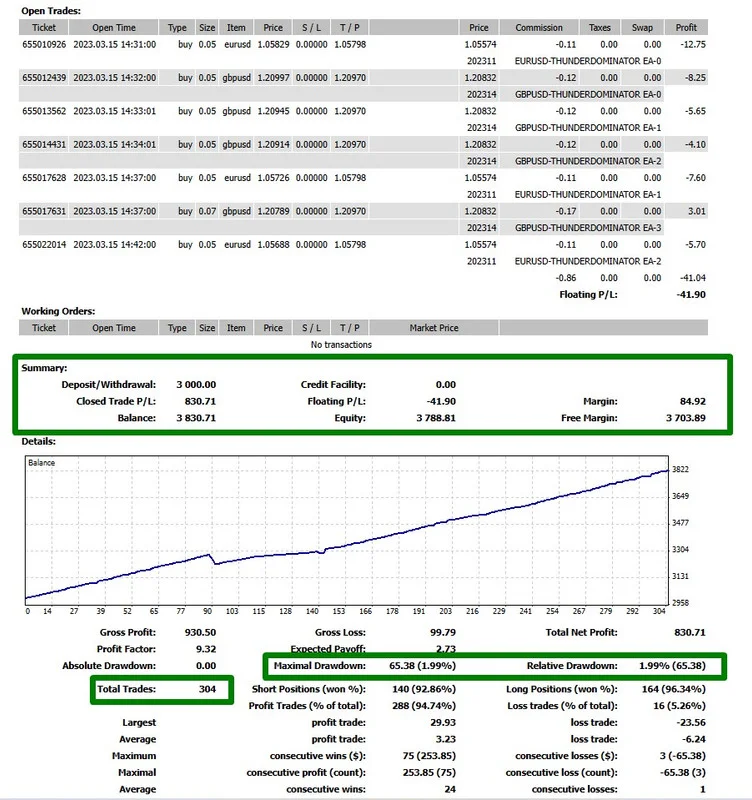
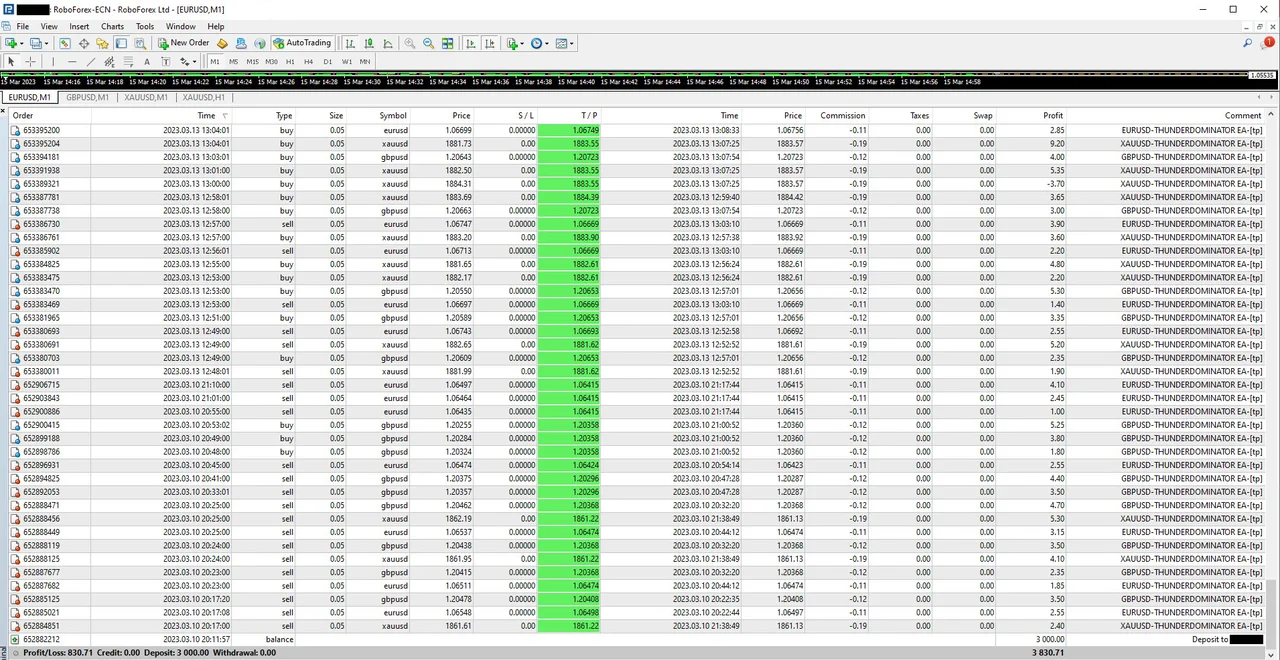
+830.71 dollars on a real account, in less than 4 trading days. The screenshots below come from that same account, so you can follow the trades one by one instead of reading a number on its own.
Strict rules inside the THUNDERDOMINATOR EA
- Hard work. The robot opens a maximum of three trades at a time per pair, which prevents excessive drawdown and keeps the work constant.
- News filter. It arrives enabled, although one click disables it whenever you prefer.
- Side market filter. Also enabled by default, it lets the robot switch strategy or stop trading when the market turns erratic or meaningless. As soon as conditions stabilise, the robot resumes.
- Effectiveness. It does not leave open or pending trades behind.
- Security. Maximum risk per trade is 2 percent of the balance on EURUSD and 5 percent on GBPUSD and XAUUSD, both active by default.
Money in the account
Use $1000 for each pair you want to trade, so three pairs mean an initial capital of $3000. That figure keeps the drawdown low, and we do not recommend less capital per pair. Traders who prefer a slower start simply run one pair, then add the second and the third once the balance allows it.
Spread and daily target
The best results come from an ECN or zero spread account, because the robot fires ultra fast trades. High spread accounts, the usual Standard or Cent ones, do not suit it. Open a demo ECN account with Roboforex and you will see how small the commissions are next to the profit per trade. Meanwhile the daily target sits at $100 per day, and you can change it. Be realistic, pick a value that works for you, and do not take more risk than necessary.
Lot multiplicator, hidden TP and invisible mode
- Lot multiplicator. We deactivate it by default, so every trade opens at 0.05. Since the robot only takes three trades at a time per pair, we left it optional for traders who want a bigger second or third trade. Change Averaging from 1 to 2 and the sequence becomes 0.05, then 0.06, then 0.07. We strongly advise against a value above 1.21.
- Hidden TP. The take profit is hidden by default, which matters if your account is not ECN. On an ECN account you do not need to hide it from the broker.
- Invisible mode. Active by default, it keeps your stop loss away from the broker. Again, on a non ECN account this option is essential.
Why the THUNDERDOMINATOR EA runs on demo first
The news filter and the erratic market filter cannot be reproduced on historical data, therefore a simulation gives you nothing useful. Instead, let the robot work on a demo account for several days, watch how it behaves and only move to a real account once you feel confident. Do not modify the parameters meanwhile. If you try a historical run anyway, the robot answers with an alert that advises exactly that: leave it on DEMO for a few days.
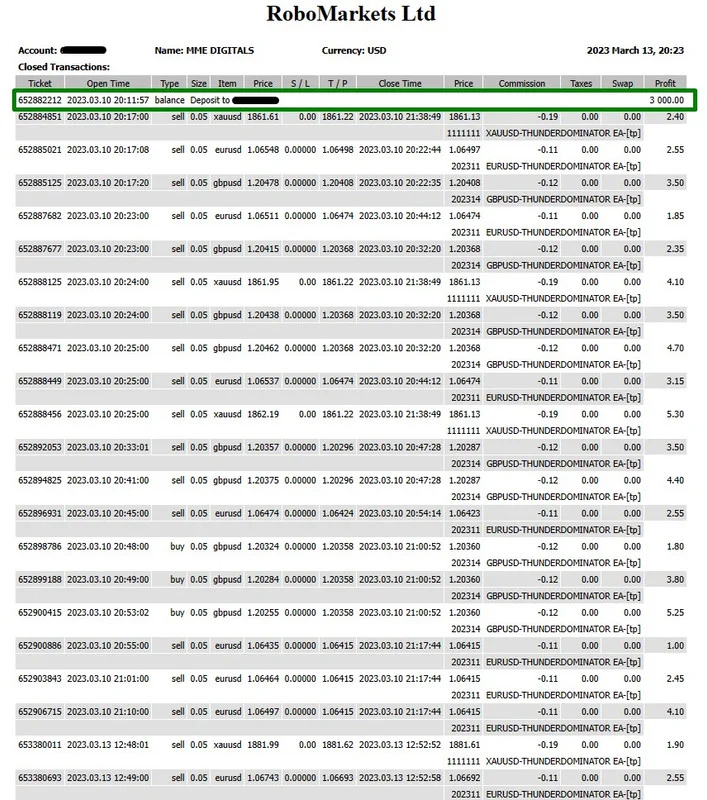
Real Roboforex ECN account, detailed statement
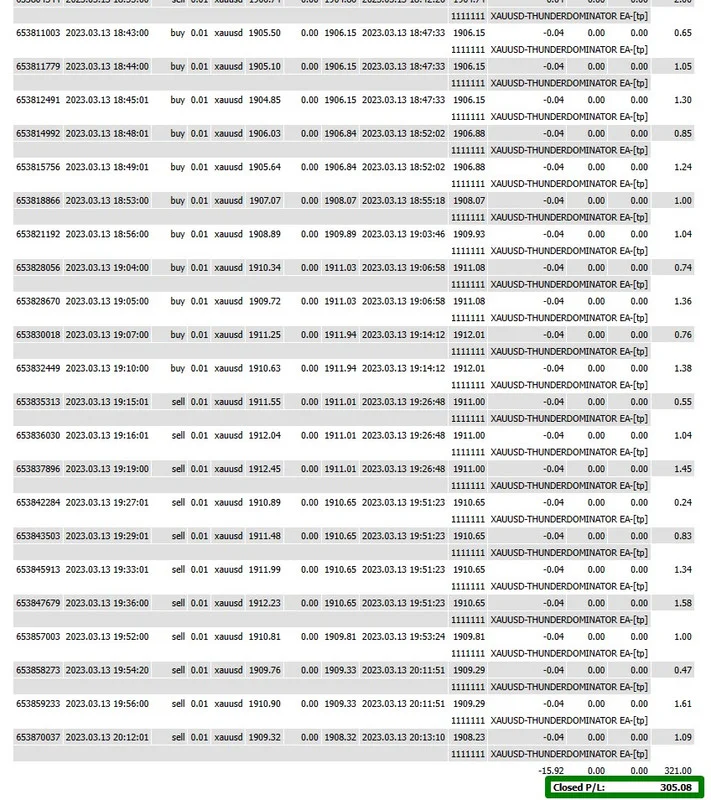
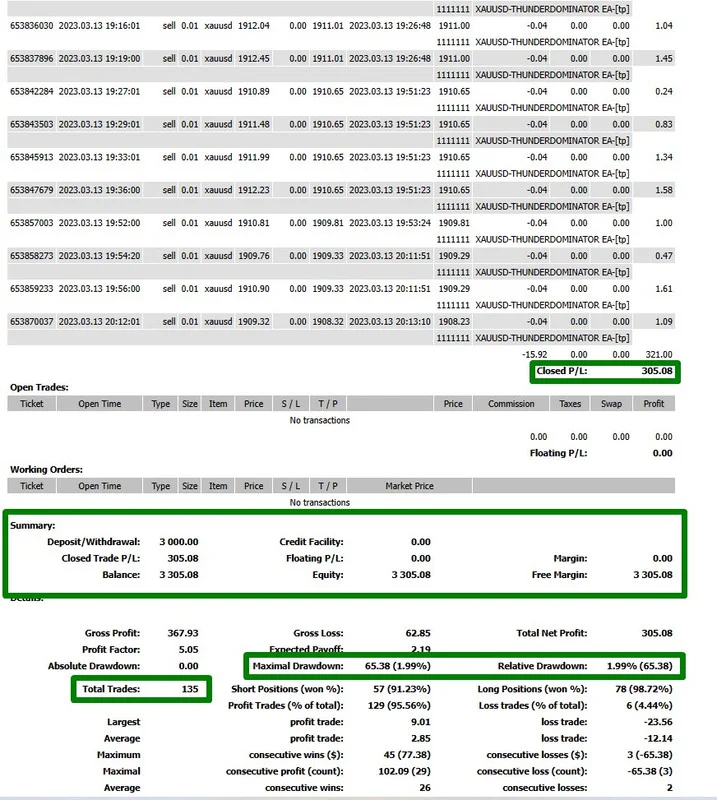
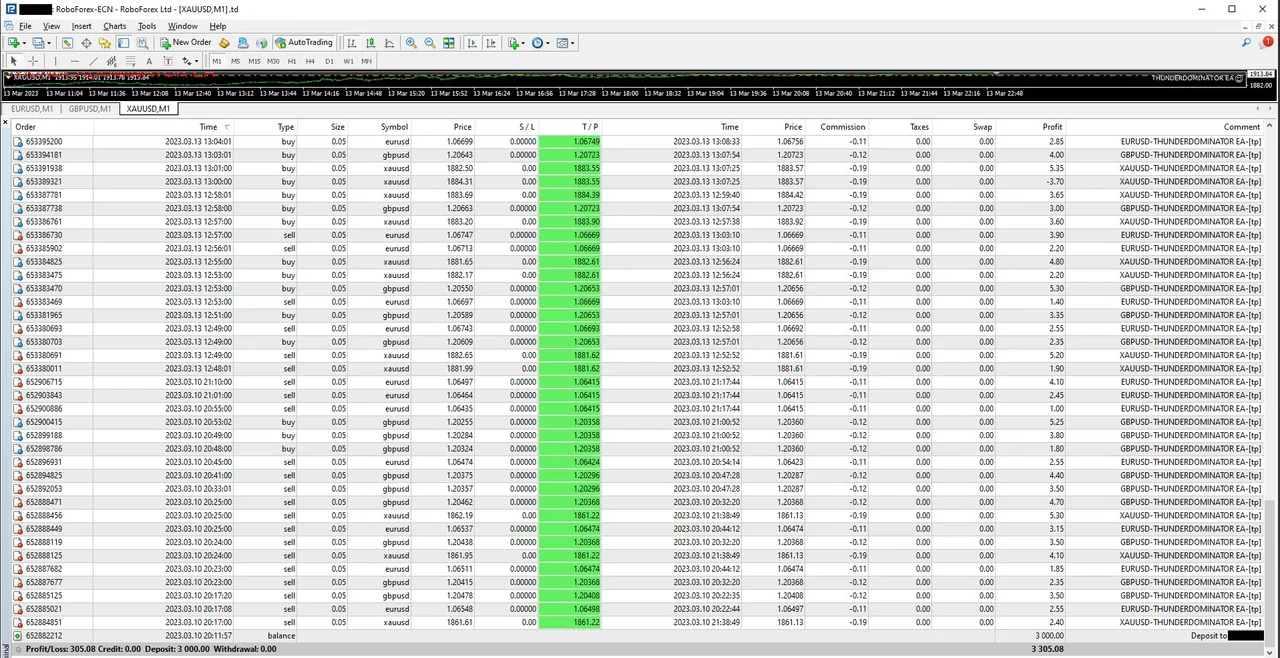
Money deposited: 3000 USD. Pairs used: EURUSD, GBPUSD and XAUUSD. The run went from Friday afternoon until Monday afternoon, and we did not stop it at the Friday close or at the Monday open, since we left autotrading active the whole time.
Money obtained in 1 day of trading: 305.08 USD. Max DD 1.99 percent.
Some tips from the desk
This robot does not trade randomly or constantly. It works when the market is at its best conditions, so a quiet spell on all three pairs is not a malfunction. News releases, sideways phases and erratic behaviour simply keep it out. You can disable those filters and run it non stop, yet we do not recommend that route.
Remember the daily target as well. If you set it at $20, the robot stops that pair once it reaches the amount and waits for the next day. As for activity, the number of trades varies with the day and the market, usually between 40 and 80 per pair per day. High frequency, although not crazy frequency.
Installing the THUNDERDOMINATOR EA in MetaTrader 4
Setup takes about a minute. First, open MetaTrader 4 and click File, then Open Data Folder. Next, copy the .ex4 file into the Experts folder inside that data folder. After that, refresh the Navigator panel, drag the robot onto an M1 chart of EURUSD, GBPUSD or XAUUSD and enable AutoTrading. Finally, load the preset that belongs to that pair before you walk away from the screen.
Three pairs, three charts
Each pair needs its own chart and its own preset, so three charts cover the whole set. All of them can share a single ECN account, although the capital has to follow the rule above, which means $3000 for the three of them. Keep the terminal open meanwhile, because an expert advisor only trades while MetaTrader 4 is running. A machine that never sleeps, or a VPS, solves that part comfortably.
Configuration panel
Do not change the presets. Load the preset that matches the pair, EURUSD, GBPUSD or XAUUSD, set the chart to M1 and leave every other setting alone. That is the whole configuration, and it is the setup behind the statements above. In other words, the less you touch, the closer your results stay to ours.
Must read before you start
- Scalping needs a broker with low spreads. Look for 0 pips, or under 5 pips, and check that spread before you trade. Do not use Standard or Cent accounts for this robot.
- With a high spread the robot will not perform as expected, so returns drop and, in extreme cases, it may not open trades at all.
- A VPS is not mandatory, although without one your computer has to stay on. A VPS close to the broker server also minimises latency. Ask your broker for recommendations, since we do not provide private VPS installation services.
Package include
Your download brings the expert advisor, 3 presets and the guides. Delivery is instant after purchase, and the guides walk you through the same steps you have read here. Questions? Write to info@binaryforexea.com.
Trading involves risk, therefore only trade with money you can afford to lose. Past performance does not guarantee future results. You trade at your own risk.
Looking for more automated robots? Then browse all our Expert Advisors.